Showing posts with label Google Plus Tricks. Show all posts

10 Amazing Facts about Google+ Statistics

[a href="https://blogger.googleusercontent.com/img/b/R29vZ2xl/AVvXsEiU9qWVUEquvXffz6WwmzUoKHJ00KAxa11nrhCsQ-VOEvmVnXnxFE037gOvJDEPnsJB7rozX0JnsmOAewmuVAE0-qzRc8SxvUbyWsGAWBARvlXoQN1MZr2jJv8oi5w5Qzk-t3rtKw8R8FA/s1600-h/google-plus-red-360%25255B6%25255D.jpg"]google-plus-red-360[/a][a href="http://www.mybloggertricks.com/2011/07/what-is-google-plus-project-is-it.html" target="_blank"]Google+[/a] is growing fast and since Google has still not revealed the real statistics therefore interesting information is continuously coming from major sites that track traffic. According to Experian Hitwise Googe+ has started building up great traffic and is quickly [a href="http://www.mybloggertricks.com/2011/07/how-to-increase-website-traffic-with.html" target="_blank"]increasing in numbers[/a]. The exact number of Google+ users is still not known but according to many third party analytics the current number of active registered Google Plus users is no less than 20-30 Million. Lets now read some interesting new stats for Google Plus from Hitwise and some other sources.

[a name='more'][/a]


  1. Around 13% U.S. Adults have signed up for Google+ and the number can hit 22% in a year. This will let Google+ become the number two social media network beating twitter and linkedIn.
  2. From July 16 onwards, Google+ has become the 42nd most-visited social networking site in U.S. and the 638th most-visited site on the world wide web
  3. Google+ has grown by 821% from the week ending on July 2, the first week Google+ was made available to its users.
  4. Around 56% of Google+’s traffic come from Google services itself. 34% come from Google.com, 37% from other search engines and 21% from Email services which includes Gmail
  5. Google+ is visited mostly by adults of age between 25-34. They account for 38.37% of all visits
  6. Los Angeles, New York City and San Francisco are the most dominant locations driving traffic to Google+ than any other place globally
  7. 55% traffic comes from USA and 18% from India
  8. 71% are Males and 21% Female Users
  9. 29% Google+ users are engineers by profession, 17% developers and 14% Designers.
  10. There are currently 25-30 Million Active Registered Google+ Users.

These were some stats that I could gather so far and all these facts are estimated figures and are not officially endorsed by Google Inc. itself.

What do you think?

Do you think Google+ will be able to capture a major portion of Facebook’s market. Development is still under progress and it is expected that Google will soon launch Games and other options for users and developers. How far do you think this new social network can go?

Source: http://www.mybloggertricks.com/2011/08/10-amazing-facts-about-google.html

Customize Google Plus : 14 ways To Change Its Look!

  • [a href="https://chrome.google.com/webstore/detail/oenpjldbckebacipkfbcoppmiflglnib" rel="nofollow" target="_blank"]Extended Share for Google Plus[/a]

2. Send and Receive Tweets on Google Plus!

You integrate your twitter account into Google plus by installing the following extension. You will have complete control over your tweets. You can read and post tweets as you wish.

Google+ Twitter

  • [a href="http://www.mybloggertricks.com/2011/07/add-twitter-to-google-plus-send-receive.html" rel="nofollow" target="_blank"]Google+ Tweet[/a]

3. Hide or Show Google Plus Comments

Hide Show Google+ commentsThis Chrome extension will let you add a show or hide comments link below each of your Google+ posts.

  • [a href="https://chrome.google.com/webstore/detail/mnhiknfpdlpmmgmecadnffgmgpgaldlo?ct=author" rel="nofollow" target="_blank"]+Comment Toggle[/a]

4. Hide Google Plus Sidebars

This Chrome extension will let you hide the left and right sidebars or columns, thus making your main content area wider and broader providing a better experience.

  • [a href="http://wittman.org/google-plus-extensions/" rel="nofollow" target="_blank"]Google+ Hide Sidebars[/a]


5.  Hide Google Plus Notification

This extension will hide the little red Google Plus notification from the Google toolbar. If you think those notifications are irritating then this app is for you!

  • [a href="https://chrome.google.com/webstore/detail/ogcfegjiehdakiogchpnllekccphhebd" rel="nofollow" target="_blank"]Hide Google+ Notification[/a]

6.  Count Unread Notifications

This little extension will display the red notifications count for unread updates only. You don't have to search which of the notifications is the new one amongst old crowded shares. Just get notified with fresh events, photos and comments only.

  • [a href="https://chrome.google.com/webstore/detail/ehcjeejpbinpibjicmpcdeenfmehlpjk" rel="nofollow" target="_blank"]Notification Count for Google Plus[/a]

7.  Zoom Photos on Google+

You can now enlarge the size of your photos for better visibility by zooming pictures out and in. It will help you see every little detail inside a photo.

photo zoom google+

  • [a href="https://chrome.google.com/webstore/detail/njoglkofocgopmdfjnbifnicbickbola" rel="nofollow" target="_blank"]Google+ PhotoZoom[/a]

8. Access Google+ From anywhere

This extension will let you share posts, read comments and see what's hot on Google Plus from anywhere. You don't necessarily be on Google Plus to find new stories. You will receive notifications on your browser while you browse through other webs.

surplus

  • [a href="https://chrome.google.com/webstore/detail/pfphgaimeghgekhncbkfblhdhfaiaipf" rel="nofollow" target="_blank"]Surplus[/a]

9.  Share Google Plus Posts on Twitter & Translate Them

You can not just share what you post on Google+ on twitter but you can also translate your posts in any language you want. Small Twitter and Google Translate links will appear just below your Post share box and you will have the choice to post or not to post them on twitter. If you want to share a post in a different language with some of your friends you can also do that by clicking the Translate link.

Translate Google+ Posts

  • [a href="https://chrome.google.com/webstore/detail/hehfpbphnjppmganambkgdnkfliaipgd" rel="nofollow" target="_blank"]Helper for Google+[/a]

10. Change Google+ Into Facebook

imageIf you want to turn your Google Plus Interface and look into Facebook then install the following app which will completing change the color scheme of Google+ into Facebook Fonts and colors.

  • [a href="http://userstyles.org/styles/50051/google-facebook" rel="nofollow" target="_blank"]Change Google+ To  Facebook[/a]

11.  Back To Top and Bottom Scroll Button For Google+

scroll buttons for Google+Its more like our blog back to top button which takes you to the top of your Google+ page if you are at the bottom and vice versa. This provides quick and easy navigation.

  • [a href="https://chrome.google.com/webstore/detail/chiikmhgllekggjhdfjhajkfdkcngplp" rel="nofollow" target="_blank"]Scroll To Top Button[/a]

12.  Hide Images On Google+

If you are sick of those high graphics animated images appearing on original and shared posts then you better get rid with them using this useful easy to use Chrome Extension.

  • [a href="http://wittman.org/google-plus-extensions/" rel="nofollow" target="_blank"]Google Plus Hide Images[/a]

13.  Search Google Plus with Google Search Engine

I guess this app will be loved by all. The extension will replace your current Google+ find People box with custom Google Search engine. You can apply all Google Search box tricks to Google+ then for finding photos, videos and other stuff using this extension.

  • [a href="http://wittman.org/google-plus-extensions/" rel="nofollow" target="_blank"]Google Plus Search With Google[/a]

14.  Split Google Plus To Two Columns

This extensions works with mozilla also. It splits your Stream page into two columns display new posts more neatlly with a more comfortable look. You will find detailed tutorial on this by reading this post:

  • [a href="http://www.mybloggertricks.com/2011/07/customize-google-stream-layout.html" rel="nofollow" target="_blank"]Liquid G+[/a]
Source: http://www.mybloggertricks.com/2011/07/customize-google-plus-14-ways-to-change.html

Google+ Video Calling: How To Set Up a Video Call?

Google Plus video chatGoogle Plus is the name you hear everywhere today. Google+ uses all major services of Google thus making it the most complete social networking site ever. It gives you an option of both Chat and Video Chat. Amazingly you can not just have to worry about your privacy issues as you did on Facebook but now you can even talk to your friends face to face by making a video call straight from your own Google+ account! This is the plus point of Google+ over Facebook. Google developers have used the same Gmail video chat algorithm to provide you with an option of both chat and video calling. Having a webcam is not a must because you can still see your friends cam with highly quality audio and video. There are however some setup guide and installation steps that you must take to successfully make and receive video calls. Lets jump straight at the tutorial.

[a name='more'][/a]

Note: Voice and video in G+ only works with the newer version of browsers i.e. FF 2.0+, IE 6.0+, Safari 3.0+, and Google Chrome

How To Install & Enable Google+ Video Calls?

Follow these easy steps

  1. Go To [a href="http://www.google.com/chat/video" rel="nofollow" target="_blank"]Google+ Video Chat Plugin[/a]  and download the plugin. It takes 2-5 seconds to install it.

Google+ video chat     2.   Congratulation you have successfully set up a Video Calling plugin for your Google+
Now you will need to learn how to make a video call on Google Plus. For that kindly read the post below:

  • [a href="http://www.mybloggertricks.com/2011/07/how-to-make-and-receive-video-calls-on.html" target="_blank"]Make and Receive Video Calls on Google+[/a]

I hope you will enjoy these posts too:

  • [a href="http://www.mybloggertricks.com/2011/07/customize-google-plus-14-ways-to-change.html" target="_blank"]14 ways to Customize Google+[/a]
  • [a href="http://www.mybloggertricks.com/2011/07/how-to-invite-friends-in-google-plus.html" target="_blank"]How To Create Circles in Google Plus[/a]
Source: http://www.mybloggertricks.com/2011/07/google-video-calling-how-to-set-up.html

How To Make and Receive Video Calls on Google+ ?


You will also enjoy these tricks:

  • [a href="http://www.mybloggertricks.com/2011/07/customize-google-stream-layout.html" target="_blank"]Customize Google+[/a]
  • [a href="http://www.mybloggertricks.com/2011/07/customize-google-plus-14-ways-to-change.html" target="_blank"]Change Google Plus Look[/a] in 14 ways!
Source: http://www.mybloggertricks.com/2011/07/how-to-make-and-receive-video-calls-on.html

Google+ Keyboard Shortcuts and ASCII Tricks


╠╛


۞


۝


®


½


¾


¼


©


¢


ﺁ ﷲ


(-’๏_๏’-)


(◐ o ◑ )


(⊙…⊙ )


(•ิ_•ิ)


(•ิ_•ิ)

๏[-ิ_•ิ]๏


(/•ิ_•ิ)

(¯`•¸•´¯)

εїз

ღღღ


Why not use these artistic ASCII characters to create impressive and eye-catching posts and comments:

▁ ▂ ▃ ▄ ▅ ▆ █ 100%
─▀██▀───▀██▀─▀██──██─▀██▀▀ ▀─
──██─────██───██▄█▀───██▄█───
──██─────██───██▀█▄───██▀█───
─▄██▄▄█─▄██▄─▄██──██─▄██▄▄ ▄─ Thank you!

 ______  __                       __               __     
/__ _/ / /
/_/ / ___ __ ___ /' ____
_ ` /'__` /' _ ` , < /',__\
/ L._/ / \` /__, `\ _
_ _ _ __/._ _ _ _ _/____/ /_
/_/ /_//_//__//_//_//_//_//_//___/ /_/


_/_/_/_/_/ _/ _/ _/
_/ _/_/_/ _/_/_/ _/_/_/ _/ _/ _/_/_/ _/
_/ _/ _/ _/ _/ _/ _/ _/_/ _/_/ _/
_/ _/ _/ _/ _/ _/ _/ _/ _/ _/_/
_/ _/ _/ _/_/_/ _/ _/ _/ _/ _/_/_/ _/


 _____  _                    _            _ 
/__ | |__ __ _ _ __ | | __ ___ /
/ //| '_ / _` || '_ | |/ // __| / /
/ / | | | || (_| || | | || < __ /_/
/ |_| |_| __,_||_| |_||_|_|___//


@@@@@@@ @@@@@@ @@@@@@ @@@ @@@
@@@@@@@@ @@@@@@@@ @@@@@@@@ @@@ @@@
!@@ @@! @@@ @@! @@@ @@! @@!
!@! !@! @!@ !@! @!@ !@! !@
!@! @!@ !@! @!@ !@! @!! @!@
!!! !@! !!! !@! !!! !!! !!!
:!! !!: !!! !!: !!! !!:
:!: :!: !:! :!: !:! :!: :!:
::: ::: ::::: :: ::::: :: :: :::: ::
:: :: : : : : : : : : :: : : :::


 ___    _____  _____  _      _ 
( _` ( _ )( _ )( ) ( )
| ( (_)| ( ) || ( ) || | | |
| | _ | | | || | | || | _ | |
| (_( )| (_) || (_) || |_( )| |
(____/'(_____)(_____)(____/'(_)
(_)


                               __ 
__ _ _ _ _ | |
| | |_|| |_ ___ |_|| |_ | |
| |__ | || '_|| -_| | || _||__|
|_____||_||_,_||___| |_||_| |__|


 _______                              _ 
(_______) _ | |
_ ___ ____ _____ _____ _| |_ | |
| | (_ | / ___)| ___ |(____ |(_ _)|_|
| |___) || | | ____|/ ___ | | |_ _
_____/ |_| |_____)_____| __)|_|


  ___|                |   |
| __| _ _` | __| |
| | | __/ ( | | _|
____|_| ___|__,_|__|_)


 _       __ ____  _       __ __
| | / // __ | | / // /
| | /| / // / / /| | /| / // /
| |/ |/ // /_/ / | |/ |/ //_/
|__/|__/ ____/ |__/|__/(_)


(¯`·._.·[ Oh Thank you Buddy! ]·._.·´¯)


°o.O Thank you Buddy! O.o°


×÷·.·´¯`·)» Thanks! «(·´¯`·.·÷×


,.-~*´¨¯¨`*·~-.¸-(_Beautiful!_)-,.-~*´¨¯¨`*·~-.¸


<º))))><.·´¯`·.Thank you!¸.·´¯`·.¸><((((º>


----•(-•Thanks Thanks!•-)•----


»-(¯`v´¯)-» Loved it! »-(¯`v´¯)-»


;)°¨¨°º°¨¨°(*)(_.·´¯`·«¤°Thank you Pal!°¤»·´¯`·._)(*)°¨¨°º°¨¨°;)


«««««««Thank you Dude!»»»»»»»»


Hope you find these simple shortcuts useful and easy. We will keep you updated with more Google+ tricks within this week. Make sure you don't miss any tutorial and subscribe via Email for free by [a href="http://feedburner.google.com/fb/a/mailverify?uri=TntByStc&loc=en_US" rel="nofollow" target="_blank"]clicking here[/a].


You may also find these tricks fun to apply:


  • [a href="http://www.mybloggertricks.com/2011/07/customize-google-plus-14-ways-to-change.html" target="_blank"]Customize Google Plus in 14 ways[/a]

Source: http://www.mybloggertricks.com/2011/07/google-keyboard-shortcuts-and-ascii.html

How to Increase Website Traffic With Google+ Sparks?

      5.   By default the Public circle will be chosen which means your link will be shared live on Google+ with all users. You must also choose your custom circles to drive even more traffic by clicking the "+Add more people" link

       6.    Finally hit the green share button and you are all done!

Your posts will be shared automatically in sparks/categories according to your Post Tiltle keywords. Repeat the same process every day for all fresh content on your webpage. You must do this even for already published blog posts.

How to Remain on Top on Sparks page?

The only logical answer is that share links as much as you can. As I earlier said that only real-time updates make it to the first page. Therefore you must  Post each and every webpage link of your website regularly and do this as much as time allows you. You will find a significant change in your analytics and once you get an idea on how to use it you can expect to receive thousands of visitors per day from Google+ alone. I hope this little info proves helpful to all of you. If you have any suggestion, question or brilliant Google+ traffic tip then you are most welcomed to share it with us using the comments box below. Stay safe and be happy always. Peace out! :»

Source: http://www.mybloggertricks.com/2011/07/how-to-increase-website-traffic-with.html

How To Remove or Block Someone in Google+ ?

     4.  This page enable you to [a href="http://www.mybloggertricks.com/2011/07/how-to-join-google-plus-send-invites-in.html" target="_blank"]invite a friend[/a], [a href="http://www.mybloggertricks.com/2011/07/how-to-invite-friends-in-google-plus.html" target="_blank"]create a circle[/a], remove a friend from a circle and most importantly block a person.

     5.   Select anyone who you want to remove or block. Simply click a badge/person

     6.   Now towards the right you will find some links as shown below,

Google+ invitation page

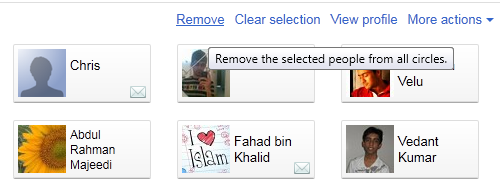
     7.   To remove someone simply click the Remove link. If you wish to block some one then click the More Actions link and choose Block  as shown below,

Block a person in Google+

      8.   You can also select multiple people and remove or block them all with a click of a mouse.

      9. That's it!

If you needed any help just feel free to post your question in the comments box below.

Source: http://www.mybloggertricks.com/2011/07/how-to-remove-or-block-person-in-google.html

How To Hide Relationship Status in Google+ Plus?

You can add as many people as you want. This will allow you the freedom to choose different people within a circle or even those not using Google+ by typing their Email IDs. I just hope you find this tutorial helpful and useful. If you needed any help with regard to your Google+ privacy settings then feel free to let me know. Would be a pleasure to help you out. Stay safe. :»

Source: http://www.mybloggertricks.com/2011/07/how-to-hide-relationship-status-in.html

Google+ Privacy: 10 Settings That You Must Know

How To Manage & Control Google+ Privacy Settings?

If you are a regular Google+ user then I will recommend that you turn of almost all options because obviously you wont need to spam your inbox with so many emails each day. You can directly read notifications on your Google+ account and find out for yourself who has mentioned you in a post, commented on your post, tagged you in a picture etc. etc.

10. How To Block or Remove a Person?

Now here comes the trouble makers. People who share sarcastic comments, posts or hateful links or videos with you. Of course the first thing that would come to your mind would be "How to block him or her?" In order to permanently block or remove a person from your circle or friend list then kindly read this post:

  • [a href="http://www.mybloggertricks.com/2011/07/how-to-remove-or-block-person-in-google.html" target="_blank"]Remove or Block a Person[/a]
Source: http://www.mybloggertricks.com/2011/07/google-privacy-10-settings-that-you.html

Google+ : How To Download Photos and Videos?

Now you can simply click the white Download your data button or you can click the individual options below. The best is to download images, circles and contacts individually. Your shared videos will be in stream data so remember to download it too.

For downloading videos on Google+ remember that all videos will be uploaded on YouTube and then shared on your Google+ account. So you will need [a href="http://download.cnet.com/YouTube-Downloader/3000-2071_4-10647340.html" rel="nofollow" target="_blank"]YouTube downloader[/a] to download videos shared on Google Plus.

Source: http://www.mybloggertricks.com/2011/07/google-how-to-download-photos-and.html

Transfer Facebook Contacts To Google Plus - Trick!

         5.  Once you click the agree button all your yahoo contacts which includes your Facebook contacts will be added to Google+. You can now add them to circles and have fun sharing love and joy. Peace out! :>

Source: http://www.mybloggertricks.com/2011/07/transfer-facebook-contacts-to-google.html

Update Facebook Status From Google Plus!


post-on-facebook-from-google+If you have to login to both sites, Google+ for new taste of social networking and Facebook because some of us just can’t stop using Facebook and migrate to Google+ at once, then this trick is all about you! Although, Google has not yet come up with any of the G+ API that may provide a shortcut, but still we can try a work around to synchronize the Google Plus status with Facebook.

[a name='more'][/a]


Drawback: Only limited number of characters go to Facebook status, due to the email template of Google+. Therefore write short and precise one liner status on Google+ in order for it to appear on Facebook.


How To Post Status on Facebook From Google Plus?


Just follow the following simple steps…


Step 1: Go to [a href="http://facebook.com/mobile" rel="nofollow" target="_blank"]http://facebook.com/mobile[/a] and click the link that says: "Send my upload email to me now" . Then check your Inbox to get your personalized email address which will be used to post text, videos, and photos straight on your Facebook profile. This is something private for you, like unique id for every Facebook user. 


This Email ID will look something like this:


bgart580coarse@m.facebook.com


Step 2: Go to [a href="http://plus.google.com/" rel="nofollow" target="_blank"]https://plus.google.com/[/a] and then click Circles section where you can invite your friends to your G+ profile.


google circles


Step 3: [a href="http://www.mybloggertricks.com/2011/07/how-to-invite-friends-in-google-plus.html" target="_blank"]Create a new circle[/a], give any name to it for example like myfacebook , click add a new person


add a new person


and then write the email address you got in step 1. Add this person to the myfacebook circle that you just created.


Step 4: You are done, now whenever you are updating your stream/status at Google+, include your myfacebook circle that contains the Facebook email by clicking the link that says "Add more people".  See below


Google+ status


Remember to check the box that says "Also email 1 person not yet using Google+"


Since your Facebook email is not using Google+ so your status will be sent to Facebook via this email.


On Facebook your status will appear like this:


Post on Facebook from google


That's all! :)


Until you get any plug-in by developers, I think this is an interesting trick that clicked my mind today and thought of sharing it. If you face any problems just let me know.


Note: Sometimes the status doesn't appear on your Facebook profile so you must try different browsers. I recommend Google Chrome.


This was a Guest Post by Umair Ahmad khan @[a href="http://www.facebook.com/umairkhan.cis" rel="nofollow" target="_blank"]Facebook[/a]
Source: http://www.mybloggertricks.com/2011/07/update-facebook-status-from-google-plus.html

How To Join Google Plus & Send Invites In Europe?

5 ways To Join Google+ In European Countries

That's it! Within next 48 hours your friends will receive invitation after which they can jump into your Circle to share the adventure. Have Fun! :>

Source: http://www.mybloggertricks.com/2011/07/how-to-join-google-plus-send-invites-in.html

Customize Google+ Stream Layout


This customization will be visible only to you and your friends can not see it but it will put a good impression on them when they connect to Plus through your personal computer. :> There is another add-on available too that will change the entire color scheme of your Google Plus account. I will share it in my coming posts.

Source: http://www.mybloggertricks.com/2011/07/customize-google-stream-layout.html

Add Twitter To Google Plus: Send & Receive Tweets

Install Twitter Application for Google+

  1. [a href="http://crossrider.com/install/529-google-tweet" rel="nofollow" target="_blank"]Click here[/a] to install the twitter app
  2. Once installed, restart your browser and log into your Google Plus account
  3. At the top you will see a twitter button. Click it and click the Sign in button so that you could permit the application to access your twitter feed.

If you wish to customize your dashboard then read this post:

  • [a href="http://www.mybloggertricks.com/2011/07/customize-google-stream-layout.html" target="_blank"]Customize Google+ layout[/a]
Source: http://www.mybloggertricks.com/2011/07/add-twitter-to-google-plus-send-receive.html
 
Play : Agame | Y8 Games | Y3 Games
Copyright © 2011. Blogger Tips And Tricks 2012 - All Rights Reserved

Proudly powered by Blogger