Showing posts with label Blogger Resources. Show all posts

Add Cool Floating Feedback Buttons in Blogger

FEEDBACK-BUTTONSHere is yet another PNG set for Feedback buttons which can be added in a similar method as we did for the previous [a href="http://www.mybloggertricks.com/2011/06/floating-feedback-buttons-set-for-blogs.html" target="_blank"]Feedback Buttons[/a] set. This time we will mouse hover effect to these buttons. The buttons will change color on mouse hover. You can do that using a simple code as shared below,

[a name='more'][/a]
[a href="#download" rel="nofollow"]Download[/a]

Add Floating Feedback Buttons With Mouse Hover in Blogger

  1. Go To Blogger > Design > Page Elements
  2. Select HTML/JavaScript widget
  3. Paste the following code inside it,


<a style="display:scroll;position:fixed;bottom:10px;left:0px;" href="URL OF CONTACT PAGE" title="Feedback Please, Can't go further without your help"><img onmouseover="this.src='IMAGE LINK 2'" src="IMAGE LINK 1" onmouseout="this.src='IMAGE LINK 1'"/></a>

Make these changes:

  • Replace URL OF CONTACT PAGE with the Link of your contact page
  • Replace IMAGE LINK 1 with the URL of image in active mode
  • Replace IMAGE LINK 2 with the URL of image which appears on mouse hover
  • Change left to right if you want the button to appear at right side of your page

     4. Save your widget and you are done!

[a name="download"]Download[/a]

The rules are old. Kindly subscribe by submitting your Email ID below,


name="loc" type="hidden"/>
type="submit"/>

Activate your feeds and post the same Email ID below so that I could send the icons immediately. By subscribing once you get free access to all blogger resources published so far.

Source: http://www.mybloggertricks.com/2011/06/add-cool-floating-feedback-buttons-in.html

Releasing The Priceless "MONOP TEMPLATE"


[a href="https://blogger.googleusercontent.com/img/b/R29vZ2xl/AVvXsEiqea8fahaq-OFeLatjQE830P5KKkYn4kO8bXZ4eS93t7cEdjdJcLUw6VAw8lP1klJLdxDnl_tj7unyckIs60umwt-yPYgcEyxRHXu0ilQzLqz2863PCzfCXyF94dtkvRgg_2XTnhaKqvM/s1600-h/image%25255B37%25255D.png"]Monop Template[/a]UPDATE: All templates and resources can be download for free without waiting from our [a href="http://downloads.mybloggertricks.com/"]download page[/a]


Whether it is EID, Christmas, New Year or Summer Vocations, I have always tried to gift my loyal friends and readers with the best resources possible. Since 60% of you requested a two Column Blogger Template, I therefore kept the word and designed a highly MONetized and  OPtimized template. Joining the starting few letters of both these words will coin up MONOP and that's how it took its name! This template can become the best turning point of your blogging careers and revenue. My main focus this time was to code it as search engine friendly as possible so that search engine spiders may love to crawl it and advertisers may love to buy an Ad spot on it.


The navigation menu is specially designed for high CTR AdSense earning by providing a beautiful section to 728 by 15 AD Link unit. I wont keep your awaiting any further, please see the Demo below,


[a href="https://blogger.googleusercontent.com/img/b/R29vZ2xl/AVvXsEhbbq-yIy3RRxHq2A4ZF30HIuz7uBXTXJm-Cl5Be5vPIh7qHkzi1Ab_1RDlDP8XaXkKkLp9kgYi7U0_DQJWsh-iPJa3HPxywekhHXlzX9sfwHV92hoSSWZWlRGl1vYuqqIjNNnKicyhf3w/s1600-h/image%25255B42%25255D.png"]compatible[/a]


[a href="http://monop-template.blogspot.com/" target="_blank"]Live Demo[/a]


What are the new Features?


As usual keeping alive the "Be Unique motto" following are the new features:


  1. The Template is coded using familiar Blogger CSS classes and HTML Tags using the minima template as the structure.


  2. It is compatible with all browsers including IE


  3. It is highly Optimized making it smoother for search engines to crawl your content


  4. It is highly monetized keeping High Click Through rate and Advertisers Likes and dislikes in mind. A [a href="http://www.mybloggertricks.com/2011/03/how-to-create-random-468x60-ad-banners.html" target="_blank"]468 by 60[/a] Banner next to Header and Adsense Link unit above navigation are the best Ad placements of this theme.


  5. It is equipped with all widgets that any blogger would wish for. May that be the beautiful [a href="http://www.mybloggertricks.com/2010/01/30-horizontal-navigation-menus-for.html" target="_blank"]Drop Down Menu[/a], Split Header, [a href="http://www.mybloggertricks.com/2011/01/add-wordpress-style-menu-tabs-widget-to.html" target="_blank"]Multi Tabs widget[/a], [a href="http://www.mybloggertricks.com/2010/01/add-customized-three-column-footer.html" target="_blank"]Three Colum Footer[/a], Customized [a href="http://www.mybloggertricks.com/2009/12/customize-blogger-comment-form-make-it.html" target="_blank"]Comment Form[/a], Customized [a href="http://www.mybloggertricks.com/2011/06/change-author-comments-color-style-in.html" target="_blank"]Author Comments[/a], Flapper [a href="http://www.mybloggertricks.com/2009/12/add-css-based-social-bookmarking-widget.html" target="_blank"]Social Share[/a] Widget, [a href="http://www.mybloggertricks.com/2011/06/related-posts-widget-for-blogger.html" target="_blank"]Related Posts[/a], [a href="http://www.mybloggertricks.com/2011/06/add-link-to-blogger-comments.html" target="_blank"]Reply link[/a], [a href="http://www.mybloggertricks.com/2009/09/attractive-read-more-button-images-for.html" target="_blank"]Read More Link[/a], [a href="http://www.mybloggertricks.com/2009/12/change-newer-posts-older-posts-and-home.html" target="_blank"]Newer Older Home Links[/a], comment count, WordPress style [a href="http://www.mybloggertricks.com/2011/05/create-wordpress-subscription-form.html" target="_blank"]RSS Form[/a] etc. etc. etc.....


  6. The header title uses Google Fonts so you don't need Photoshop any more to create a nice logo.


  7. All tutorials published on this blog or anywhere else, can easily be applied to it without getting any error


Download MONOP


We serve resources to subscribers only. If you are a current subscriber then kindly post your Email ID in the Comments Box, else if you are new a MBT reader then kindly submit your Email ID below to receive all such useful resources for free,


After submitting your Email ID, kindly check your inbox and activate the feeds, then submit the same Email ID in the [a href="http://www.blogger.com/blogger.g?blogID=8193278726666811965#comments"]comments box[/a] below to receive the download copy instantly.


Respect Copyright


This Template is not for sale and should not be redistributed without permission from MBT. Kindly respect the hours of hard work put in coding this template and providing it for free. The template contains a link to MBT Blog as attribution. Kindly do not remove it. In case of any violation I would be compelled to report that Blog URL to [a href="http://www.dmca.com/Protection/Status.aspx?id=bfbdb466-185b-40d8-9159-782e5e3d9ed2" target="_blank"]DMCA[/a]. The violator will be ignored as a reader and deleted from the subscription list. No question of the violator will be answered on any tutorial published so far.


Customization


Below are some simple important changes that you must make:

Navigation:

[a href="https://blogger.googleusercontent.com/img/b/R29vZ2xl/AVvXsEhN61Ex4fQLhUdvAGTzmdOABpxvcX3F2Oo0jtW610fPSyAoK4QStBAaVFDhbC8vEoztsYZn-kCQrxEBWNkd5Tu6D_QS0m-yc0WXnSINQqV_J7JSWUshj54j9RjQy6Y-pyEjN7TtFDfYp0k/s1600-h/image%25255B34%25255D.png"]drop down menu[/a]

To change the navigation menu links find and edit this code,


<div id='subnavbar'>
      <ul id='subnav'>
        <li>
          <a expr:href='data:blog.homepageUrl'>Home</a>
        </li>
        <li>
          <a href='#'>About</a>
        </li>
        <li>
          <a href='#'>Contact</a>
        </li>
  <li>
           <a href='#'>Sitemap  <img src='https://blogger.googleusercontent.com/img/b/R29vZ2xl/AVvXsEjr7JjjGog18MSr464R_u0lTZuyXHR-Reuk4xQ6arM8fAF8NPpUlP2NBEXDpr6I8qiBUI5OnjPCCssBLqb1WKe51Cu0sbtlgr8s50BODO5_FqMP0DWcGKy1JkCwqZADz5cGTccIKjgZE2g/s400/arrow-down.png'/></a>

             <ul>
                <li><a href='#'>Sub Page #1</a></li>
                <li><a href='#'>Sub Page #2</a></li>
                <li><a href='#'>Sub Page #3</a></li>
              </ul>

        </li>
  <li>
          <a href='#'>Download This Theme</a>
        </li>
      </ul>     </div>


Replaced the bolded black texts with your link titles and the # sign with link URLs


You can also add more menu tabs by adding this code as many times as you want just above </ul>


<li><a href='#'>Title</a></li>

If you wish to add a drop down menu to any tab then simply add the code below before the </li> tag of any tab (for example see carefully how I added it to the Sitemap tab),


<ul>
                <li><a href='#'>Sub Page #1</a></li>
                <li><a href='#'>Sub Page #2</a></li>
                <li><a href='#'>Sub Page #3</a></li>
              </ul>


AdSense:


This part is the most important reason behind designing this template. I will discuss its customization and integration method on my coming post because I want to explain it in detail.


Multi Tab:


To change the titles of tabs simply find them in your template and replace them with whatever title you like. For more details on this read the [a href="http://www.mybloggertricks.com/2011/01/add-wordpress-style-menu-tabs-widget-to.html" target="_blank"]Menu Tabs[/a] tutorial


RSS Form:


To add the rss form paste the code below inside a HTML/Javascript widget,


<style>

    .mbtbar{width: 100%; float: left; padding:0; margin:0;}

    .mbtbar .count{color:#333; font-size: 14px; font-weight: bold; font-family: Helvetica, Arial; background: none;  line-height: 35px; vertical-align: middle; width: 300px; padding: 0 10px 0 4px;}

    .mbtbar .count span.bigcount{color:#BF0100; font-size: 24px; font-family: Helvetica, Arial; line-height: 35px; vertical-align: top; padding-right:3px;}

    .mbtbar .subicons{border-bottom: 1px solid #e6e6e6; margin: 0px 0 0px 0; float: left; width: 300px; font-family: Helvetica, Arial; font-size: 14px;}
    .mbtbar .subicons a{text-decoration: none; color:#333333;}
    .mbtbar .subicons a:hover{text-decoration: underline; color:#333333;}

    .mbtbar .subicons .rssicon{border-right: 1px solid #e6e6e6; background: url(https://blogger.googleusercontent.com/img/b/R29vZ2xl/AVvXsEgy3wjW-ZCfuCXwhM2MhN4SZbOIKn1q1w1AzV7eFcNx-ACYtTlWoGFVP5jrZFxuBbut8OxQgG3g4G3WxFeddH2J3eo4-iZ-QO3SON7_gpPZ877RvUSaOSK7-sKM7imyVTbCEmIsZ2W4jtY/s400/rss.png) no-repeat left center; min-width: 20px; height: 48px; line-height: 57px; vertical-align: middle; float: left; padding: 0px 20px 0px 30px; margin: 0 0 0 5px;}

    .mbtbar .subicons .fbicon{border-right: 1px solid #e6e6e6; background: url(https://blogger.googleusercontent.com/img/b/R29vZ2xl/AVvXsEjbEtOLUBDsHQBV2heqV_QP35EWhO7nZD2OWHLwJ7HWwzY9N9hAbusMzEK3lanRHhbpHWyAv_nR3XjHyiNwfmqRHmbzvpe669LfYuuF-UNmtgbeICwkFi1DIYI-Oq-GImZjPPG6wUTLonU/s400/facebook.png) no-repeat left center; min-width: 20px; height: 48px; line-height: 57px; vertical-align: middle; float: left; padding: 0px 20px 0px 30px; margin: 0 0 0 5px;}

    .mbtbar .subicons .twittericon{background: url(https://blogger.googleusercontent.com/img/b/R29vZ2xl/AVvXsEgPuEMh25j8Mq9Tqw6VQJCFGWEAasmlHEIU8GsBWcylGa1sv_O77OjxUdQL5U8JQ72OcSvsAjUnameHBSlR5xwKKPFibXksi_ZJjPXBUgoUy4YMGjv6ojOy4zPf_oF3RmIg2NrtSqab0kE/s400/twitter.png) no-repeat left center; min-width: 20px; height: 48px; line-height: 57px; vertical-align: middle; float: left; padding: 0px 20px 0px 30px; margin: 0 0 0 5px;}

    .mbtbar .emailsub{border-bottom: 1px solid #e6e6e6; padding: 15px 0 20px 0; float: left; width: 100%; font-family: Helvetica, Arial;}

    .mbtbar .emailsub .emailicon{background: url(https://blogger.googleusercontent.com/img/b/R29vZ2xl/AVvXsEjRNEymuWOz3kG277wD0JP3KXVDijc61RZm4vBg1NjM3VHqlgzEfe-d_cOabeFcJeecm1my_BrIyL762NPgN8mfVT0CJMUypd_85TddqqMk6YA1OQ5lIQumbbetbmhyCbK5t2Ui_e2EM0Q/s400/email.png) no-repeat left center; float: left; padding: 5px 15px 0px 35px; margin: 0 0 0 5px; width: 300px; height: 28px; line-height: 28px; vertical-align: middle; font-size: 14px; color: #333; }

    .mbtbar .emailsub .emailupdatesform{margin: 15px 0 5px 5px; width: 300px; float: left;}

    .mbtbar .emailsub .emailupdatesform input.emailupdatesinput{background: #fff !important; float: left; border: 1px solid #d2d2d2; padding: 0px 8px 0px 8px; color: #a19999; font-size: 12px; height: 25px; width: 200px; -moz-border-radius: 5px; -webkit-border-radius: 5px;}

    .mbtbar .emailsub .emailupdatesform input.joinemailupdates{background:-moz-linear-gradient(top,#bf0100 0%,#ac0100 100%); background:-webkit-gradient(linear,left top,left bottom,from(#bf0100),to(#ac0100)); border: 1px solid #ac0100; text-transform: uppercase; color: #fff; height: 25px; padding: 0 12px 0 12px; margin: 0 0 0 5px; -moz-border-radius: 5px; -webkit-border-radius: 5px;}


    </style>

    <!--[if IE 7]>
    <style>
    .mbtbar .count span.bigcount{color:#F17C18; font-size: 24px; font-family: Helvetica, Arial; line-height: 34px; vertical-align: middle; }

    .mbtbar .emailsub .emailupdatesform input.joinemailupdates{background:#AC0100; border: 1px solid #AC0100; text-transform: uppercase; color: #ffffff; font-weight:bold; height: 25px; padding: 0 12px 0 12px; margin: 0 0 0 5px; }
    </style>
    <![endif]-->

    <div class="mbtbar"><div class="count">Join <span class="bigcount">1807+</span> People Following MBT</div><div class="subicons"><div class="rssicon"><a href="http://www.mybloggertricks.com/feeds/posts/default" target="_blank">RSS</a></div><div class="fbicon"><a href="http://www.facebook.com/pages/My-Blogger-Tricks/147104632016744" target="_blank" rel="nofollow">Facebook</a></div><div class="twittericon"><a href="http://twitter.com/mybloggertricks" target="_blank" rel="nofollow">Twitter</a></div></div>
    <div class="emailsub">
    <div class="emailicon">Stay Updated via Email Newsletter</div>
    <div class="emailupdatesform">
    <form action="http://feedburner.google.com/fb/a/mailverify" method="post" target="popupwindow" onsubmit="window.open('http://feedburner.google.com/fb/a/mailverify?uri=tntbystc', 'popupwindow', 'scrollbars=yes,width=550,height=520');return true"><input gtbfieldid="10" class="emailupdatesinput" name="email" value="Enter your email..." onblur="if (this.value == &#39;&#39;) {this.value = &#39;Enter your email...&#39;;}" onfocus="if (this.value == &#39;Enter your email...&#39;) {this.value = &#39;&#39;;}" type="text" /><input value="tntbystc" name="uri" type="hidden" /><input value="Join" class="joinemailupdates" type="submit" /></form></div></div></div>

To customize the above code with your twitter, facebook and Feed links then read this tutorial: [a href="http://www.mybloggertricks.com/2011/05/create-wordpress-subscription-form.html" target="_blank"]Create RSS Form[/a]


Let me know how you liked it!


Please let me know if this new design came up to your expectation. What suggestions can you give for the next design and what ideas do you have that you wish to add. It would be a pleasure answering all your queries and customization questions related to this template. Download and install it now! Start blogging with a new zeal and enjoy happy earnings as a reward. Peace and blessings buddies. :>

Source: http://www.mybloggertricks.com/2011/06/releasing-priceless-template.html

Floating Feedback Buttons Set for Blogs

[a href="https://blogger.googleusercontent.com/img/b/R29vZ2xl/AVvXsEimYJyANn95-LOFjqhi5ALgWHDGgBWJU-3Tu9ubKogkaXlO98bbqFiP89wr_isZc8SxogvnAGgfCM6D8RvEJoNo61A5vaSCjaCXLcITm38nOPv0eLAsDb0EJFVROIuQFue1FeCyeMjMpJY/s1600-h/FEEDACK-BUTTONS10.png"]FEEDACK-BUTTONS[/a]I had sometime in evening so designed some Feedback PNG buttons which is an important tool to receive advices and suggestions from your readers. You have seen a [a href="http://www.mybloggertricks.com/2009/05/create-floating-feedback-and-back-to.html" target="_blank"]floating feedback button[/a] on almost all major websites and its time that you add one too.  The set below consists of 10 PNG buttons along with the PSD file if in case you wanted a color of your choice.

[a name='more'][/a]
[a href="#download"]Download Set[/a]


How to Add a Feedback Button to Blogger

The steps are very simple. Download the icons and upload your favorite feedback button in Blogger. Once done, you may then follow few steps below,

  1. Go To blogger > Design
  2. Choose a HTML/JavaScript Widget
  3. Paste the following code inside it,

<a style="display:scroll;position:fixed;bottom:50%;left:0px;" href="URL OF CONTACT PAGE" title="Feedback Please, Can't go further without your help"><img src="FEEDBACK BUTTON IMAGE LINK" /></a>

Make these changes:

  • By default the button will appear at center left but if you want to shift it to right then change left to right.
  • Replace URL OF Contact page with the address link of your [a href="http://www.mybloggertricks.com/2009/09/releasing-highly-stylized-contact-me.html" target="_blank"]contact me page[/a].
  • Replace Feedback Please, Can't go further without your help with any message you may like the visitors to see when they hover their cursor on the button
  • Replace FEEDBACK BUTTON IMAGE LINK with the image link of your uploaded button

       4.   Save your template and see it hanging on your blog! :)


[a name="download"]Download:[/a]

All Resources are always shared with subscribers, if you are already a subscriber then kindly post your EMAIL ID in comments or if you are a new visitor then kindly submit your EMAIL ID below,


name="loc" type="hidden"/>
type="submit"/>

Activate your feeds and then post the same email id below so that we could email you the download copy within 24 hours. By subscribing once you can download any icons, buttons, templates or goodies published by us so far.

Source: http://www.mybloggertricks.com/2011/06/floating-feedback-buttons-set-for-blogs.html

My Favorite 100 Fonts - Free Download

FAVOURITE-100-FONTSMost of you asked what fonts I use to create my intro images on Photoshop or the fonts I use while designing blogger templates. I have compressed and gathered the complete list of all my fonts I had on my PC  for free download. I just hope you will enjoy using them for your design works and make your blogs even more eye catching.

[a name='more'][/a]


Download The Best 100 Fonts

Since we share resources with subscribers only therefore current subscribers are requested to post their Email Id's in the [a href="#comments"]comment box[/a] in a spam protected way and new readers are requested to kindly subscribe by submitting your Email address below:


name="loc" type="hidden"/>
type="submit"/>


After subscribing you will get an email to activate the Feed updates, please do that and then post the same Email address in the comment box below.

Source: http://www.mybloggertricks.com/2011/06/my-favorite-100-fonts-free-download.html

700+ Smashing Web2.0 Icons For Web Designing- Free!

web2-icon-setFree Icons, buttons or any blogger goody is something that is always welcomed by all. I am sharing some of my Freeware Icon collection that I have collected over the recent years for my designing projects. This web2.0 icon set contains everything you may need, from blog icons, forums, iphone, social media networks till RSS icons. All packed in one jumbo magic set! To get a free png copy of the this great collection, kindly submit your Email ID below in order to become a valuable MBT reader and avail tons of such resources for free.

[a name='more'][/a]


name="loc" type="hidden"/>
type="submit"/>

After subscribing, activate your feeds and then post your Email ID with which you subscribed in the [a href="#comments"]comment form below[/a], so that I could send you the banners immediately

Source: http://www.mybloggertricks.com/2011/06/700-smashing-web20-icons-for-web.html

Top Ten Mozilla Add-Ons for Web Designers & Developers

2. CSS Usage

4. Seo Quake

6. HTML Validator

8. Web Developer

9.ColorZilla

FireFTP is a free, secure, cross-platform FTP/SFTP client for Firefox which provides easy and intuitive access to FTP/SFTP servers. Along with transferring your files quickly and efficiently, FireFTP also includes more advanced features such as: directory comparison, syncing directories while navigating, SFTP, SSL encryption, search/filtering, integrity checks, remote editing, drag & drop, file hashing, and much more…  [a href="https://addons.mozilla.org/en-US/firefox/addon/fireftp/" target="_blank"]Download The Add-on[/a]


Umair let me take the opportunity of commenting first on one of your extremely valuable post. As a web designer my self, I had never looked into the importance of these tools as much as you made it looked so simple and useful. I often wasted a lot of time troubleshooting browser compatibility issues linked to codes in the templates but never realized that how easily these errors could be solved using these brilliant tools. I personally liked it a lot and your post forced me to give you a thumbs up! Great work.

  Umair Ahmed Khan


About the Guest Author:

Umair is an Undergraduate Student, pursuing his B.E Degree in Computer and Information System Engineering. He has a desire to develop IPhone and Android applications in future. You can contact him always at his [a rel="nofollow" href="http://www.facebook.com/umairkhan.cis"]Facebook[/a]

Source: http://www.mybloggertricks.com/2011/05/top-ten-mozilla-add-ons-for-web.html

Download 25 Free PayPal Donate Buttons!

free Paypal ButtonsAdding a PayPal donate button has become a formality now for all webmasters. I have shared a tutorial earlier on [a href="http://www.mybloggertricks.com/2010/12/add-customized-paypal-donate-button.html" target="_blank"]how to add a PayPal Donate button to your Blogger Blogs[/a] and now its time to replace the default PayPal donate button with a stunning and eye catching one. I hope you will like the collection below which is gathered from different sources and is not the property of MBT Blog. They are shared only for non-commercial purposes.

[a name='more'][/a]


Those of you who don't have a windows live ID can download it from here,

2 3
paypal-icon66
service_paypal_add paypal-icon3
paypal-icon5 paypal-icon4
Paypal-icon1 paypal-icon
paypal333 Paypal-64
paypal33 paypal22
paypal2 paypal_straight
paypal1 paypal_curved_32px
paypal
grey_paypal_stamp Honeycomb-Paypal-64
paypal3 credit_card_paypal
Source: http://www.mybloggertricks.com/2011/06/download-25-free-paypal-donate-buttons.html

60+ Free "Advertise Here" 125 by 125 Banner Images


125-by-125-banners

Advertisements are the soul source of income for any web owner. Attracting advertisers is an art that must be learnt the early the possible. We have compiled a collection of some great static "125 by 125" Advertise here banners that you can use to attract as many advertisers as possible. The collection includes a total of 60+ splendid well designed banners. Kindly submit your email ID in the subscription form below to receive free updates of MBT blog plus receive tons of such coolest blogger goodies straight to your inbox.

[a name='more'][/a]


name="loc" type="hidden"/>
type="submit"/>


After subscribing, activate your feeds and then post your Email ID with which you subscribed so that I could send you the banners immediately. You will also find these tutorials helpful,

  • [a href="http://www.mybloggertricks.com/2009/08/releasing-125-by-125-animated-ad.html"]125 by 125 Animated Ad Banners For Blogs – Biggest Advertising Collection Ever![/a]
  • [a href="http://www.mybloggertricks.com/2010/07/random-ad-banners-widget-for-blogger.html"]Random Ad Banners Widget For Blogger[/a]
  • [a href="http://www.mybloggertricks.com/2009/09/125-by-125-ad-banner-widget-for.html"]125 by 125 Ad Banner Widget For Blogger/Blogspot Blogs.[/a]
Source: http://www.mybloggertricks.com/2011/06/60-free-here-125-by-125-banner-images.html

Download Facebook Style Bookmarking Buttons

Current Subscribers may simply post their Email IDs in the comments. I hope you will find it useful. I do humbly apologies for not replying to the previously posted queries and feedback. I will reply them all shortly. I hope you guys are doing fine and as chilled as before. Peace out! :D

Source: http://www.mybloggertricks.com/2011/05/download-facebook-style-bookmarking.html

Windows Live Writer 2011 Amazing Features


1- Horizontal Line Like the one below

2- Clear Break : Just like a <br/> tag that adds a break or gap to your paragraph or image.

3- Read More Link - Post Splitter

These features are important to inform users about updates or while splitting a post into half using the [a href="http://www.mybloggertricks.com/2009/09/attractive-read-more-button-images-for.html" target="_blank"]read more link[/a]

3) Better Insert Options

Insert Options In WLW

You can easily insert images, videos, hyperlinks, Google Maps, Social Media tags, emoticons and the best of all "Plugins", which equips WLW with things that you may need out of those provided by default.

4) Hyperlink and Image Tagging

Hyperlinking and Image Tagging

Clicking the hyperlink will open the window above where your copies Link will automatically appear in the web address option and the only thing you need to do is to give it some description and check the "Open Link in a new window" option in order to apply the target="_blank"  tag. You can also add a keyword to rel tag for better optimization.

By Clicking on image you can also insert title tags and alt tags to it as shown below. This increases your Google Image Search Rankings.

image

5)  Take Screenshots

Take screenshot using the Print Screen key on your keyboard and then click any where in your Draft Post to paste the screenshot using Ctrl+V. You can then Resize and crop the image by clicking it and then using the tools already provided in the Writer.

Take screenshots in WLW

Now you do not need [a href="http://www.mybloggertricks.com/2010/01/photoshop-image-editing-basics-for.html" target="_blank"]photoshop or Windows Paint or any Image editing website to take screenshots.[/a]

6) Advance Cropping


Image cropping in wlw

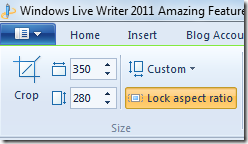
After taking a Clean and neat screenshot you will need to crop it. The Crop tool helps crop and slice the image accurately using its rotate, auto-resize and grid option.

7) Post Draft To Blog

post draft to blog

Most of the times you cant take your laptop to some places but what if you needed to publish a post you had written in WLW using your Blogger Account?

The above option creates a draft post on your Blogger Account. You can then publish that post whenever you want using any computer connected to internet.

blogger draft post

8) Headings


image

I have styled all my Post headings. This helps to give a more attractive look to your blog posts and also increases pageviews. As you can see above I am using a different style for H2 tag and different for H3 and H5. This CSS styling is done in my template manually and not by WLW. To learn how to do it read -> [a href="http://www.mybloggertricks.com/2009/11/change-heading-style-in-blogger.html" target="_blank"]6 Ways to Style your Blog Headers[/a]


9) Subscript and Superscript and Text Highlighter

image

You can also highlight a text using several different colours.

10) Better Word Count

image

This tool is important in a sense that you can count the number of characters in your title using it for better optimization as well as you can keep track of the length of the post written.

10) Picture Rotation

image

Pictures can be rotated clockwise and anticlockwise and also tilted. It helps to give an attractive look to your images.


Do You Still Want To use Blogger Editor?

I am sure you are smart enough to make a better decision now. I am using it and I can never think of blogging without it to be honest. To Download the latest version of WLW 2011 please click the link below,

  • [a href="http://explore.live.com/windows-live-writer?os=other" target="_blank"]Download Windows Live Writer 2011[/a]

To Learn how to use WLW then please read this tutorial,

  • [a href="http://www.mybloggertricks.com/2011/05/use-windows-live-writer-kick-blogger.html" target="_blank"]How To Use Windows Live Writer[/a]
Source: http://www.mybloggertricks.com/2011/05/windows-live-writer-2011-amazing.html

Show / Display Skype Emoticons In Blogger Comment Form

After creating the [a target="_blank" href="http://www.mybloggertricks.com/2009/08/introducing-mind-blowing-circular-style.html"]Circular Style[/a] and [a target="_blank" href="http://www.mybloggertricks.com/2009/08/releasing-gorgeous-mbt-social-media.html"]Trigonal Style[/a] Social Bookmarking Icons, I decided why not create some animated social media icons set, which may look professional, eye-catching and yet unique! I am excited to have successfully published our third Icon set which is different in every aspect. See it for yourselves. Hover your mouse cursor over the icons below to see the flapping effect.


The download file below contains The Flapper Icons Set. All these icons are available in png format and in sizes 32px, 48px, 64px and 128px.

[a target="_blank" href="http://dstats.net/download.php?file=http://sites.google.com/site/mybloggertricks/Home/THEFLAPPER.rar?attredirects=0"][/a]

Downloads: [a href="http://dstats.net/download.php?file=http://sites.google.com/site/mybloggertricks/Home/THEFLAPPER.rar?attredirects=0"][/a]


To add these icons to your blogs, websites, forums etc use the respective codes below,

<!-- DELICIOUS CODE STARTS -->
<img width="" height="" onmouseover="this.src='https://blogger.googleusercontent.com/img/b/R29vZ2xl/AVvXsEhZK8Sx3-UPLx39jb3xA_VX5Ypn7O8_Jj4gWZQ8LH57FGpzOKuP7z1m5dQ3X17latY3NAJ2dLjg-H0dU70Ssm3VZUB8RlIr8M_lYsa5NJu_mhBh7WZhPtJ1pVK3ojsm_0tNCxuTT52AkW0/s400/DELICIOUS1.png'" src="https://blogger.googleusercontent.com/img/b/R29vZ2xl/AVvXsEjNeBSmcojunxQQwgdbWP1JNLwOT4YJCb7uXIdSLUTllRC_QnrPd2lcubB_9RnSsDkggUhnvgWUUDN3vl9ibgf60a6tY3NX2ziLMh62tUlwJkqXjQLkVgmhLK8i8Fl-URxA7FOqGsPVdGc/s400/DELICIOUS2.png" onmouseout="this.src='https://blogger.googleusercontent.com/img/b/R29vZ2xl/AVvXsEjNeBSmcojunxQQwgdbWP1JNLwOT4YJCb7uXIdSLUTllRC_QnrPd2lcubB_9RnSsDkggUhnvgWUUDN3vl9ibgf60a6tY3NX2ziLMh62tUlwJkqXjQLkVgmhLK8i8Fl-URxA7FOqGsPVdGc/s400/DELICIOUS2.png'"/>
<!-- DELICIOUS CODE ENDS -->

<!-- RSS CODE STARTS -->
<img width="" height="" onmouseover="this.src='https://blogger.googleusercontent.com/img/b/R29vZ2xl/AVvXsEj5I8A815qAhe_TpHoZ0Qz4Niwn7TCcrcGxvpPjCxuF7W2hRHPXK6bt8B9-mVgBWKODkdbnGp6a622F5AYCagbOvKvy-oNxyrEd1QaDIZyGJ_VDzzhkSFMMETc89YK89wU52SzVGhb4pTI/s400/RSS1.png'" src="https://blogger.googleusercontent.com/img/b/R29vZ2xl/AVvXsEiA4w0d4SWYa7_PND71s9FwAdSq79Xje7U081aeOXttI01Lq8751lhJf_tzoqpwcBUBQeuwHBYW-TIzgpiYrpELSkiwhFLyTwA-TmiV2zAT9ihIfjgnwy4gm5HpbCM-TdViZnsM9vuN-i8/s400/RSS2.png" onmouseout="this.src='https://blogger.googleusercontent.com/img/b/R29vZ2xl/AVvXsEiA4w0d4SWYa7_PND71s9FwAdSq79Xje7U081aeOXttI01Lq8751lhJf_tzoqpwcBUBQeuwHBYW-TIzgpiYrpELSkiwhFLyTwA-TmiV2zAT9ihIfjgnwy4gm5HpbCM-TdViZnsM9vuN-i8/s400/RSS2.png'"/>
<!-- RSS CODE ENDS -->

<!-- YOUTUBE CODE STARTS -->
<img width="" height="" onmouseover="this.src='https://blogger.googleusercontent.com/img/b/R29vZ2xl/AVvXsEgwz3x5VQE4aSohugwQ_MYRuhGB6Qc7r4HNZe-aNATDEQ8RQX2ucahnQbY8GhnIqc_klMG4xX00q0AajtlTgz-tQkpkgsl1qy77xUmldhUJRhSsJN5aNIKS_HCWC3c8l_rTFLjxWyovMsU/s400/YOUTUBE1.png'" src="https://blogger.googleusercontent.com/img/b/R29vZ2xl/AVvXsEjbxEE9sbDbPvHDMYQ8NYuJ1zEKXC3rq3ryoOmpjUMBv9iYaTjDkfUAggVNG0lR2GtvlfWo6MK9Dr0RqcmfJ4PCGxVnOxFphOXMADjbjByqB0LboPXwgkv-mTcT-nGgHSxdB7hkZNCLI1M/s400/YOUTUBE2.png" onmouseout="this.src='https://blogger.googleusercontent.com/img/b/R29vZ2xl/AVvXsEjbxEE9sbDbPvHDMYQ8NYuJ1zEKXC3rq3ryoOmpjUMBv9iYaTjDkfUAggVNG0lR2GtvlfWo6MK9Dr0RqcmfJ4PCGxVnOxFphOXMADjbjByqB0LboPXwgkv-mTcT-nGgHSxdB7hkZNCLI1M/s400/YOUTUBE2.png'"/>
<!-- YOUTUBE CODE ENDS -->

<!-- YAHOO CODE STARTS -->
<img width="" height="" onmouseover="this.src='https://blogger.googleusercontent.com/img/b/R29vZ2xl/AVvXsEgJvE59Z206NAmsLS_yMmaeyCAbF1r2ZGZMLxR4nFFJypYWvBZYPlUcoUWs8zRnL86ylzozM1YDVe0Y08m7LH6WCuAoBCZue1-XajD5aUQ4bRDVBPk7oJ-z9ydc4CEW3kLvMbr0yB4VGQg/s400/YAHOO1.png'" src="https://blogger.googleusercontent.com/img/b/R29vZ2xl/AVvXsEgXVcaEfCAxB37GqJ9p2bgSYnW0Kx1AC2cTvgtuqHJke78VoDtuSaUOhkz6lX1igmImekuz7J4_rKWZP1K-oNAvp10NP0bRT6cSchvg9aWRe-jmoHywgWQ8-eEaA61ECJ5bqAWnlQPZPWQ/s400/YAHOO2.png" onmouseout="this.src='https://blogger.googleusercontent.com/img/b/R29vZ2xl/AVvXsEgXVcaEfCAxB37GqJ9p2bgSYnW0Kx1AC2cTvgtuqHJke78VoDtuSaUOhkz6lX1igmImekuz7J4_rKWZP1K-oNAvp10NP0bRT6cSchvg9aWRe-jmoHywgWQ8-eEaA61ECJ5bqAWnlQPZPWQ/s400/YAHOO2.png'"/>
<!-- YAHOO CODE ENDS -->

<!-- TWITTER CODE STARTS -->
<img width="" height="" onmouseover="this.src='https://blogger.googleusercontent.com/img/b/R29vZ2xl/AVvXsEjA1bzPBrJiqoiivbNaW56blQCkXKgvM6PHfhnAUYL87_c3dHXdjWsfYMJ9v0IWFAy9JRAeWOcq5CHSO3ytYuajfgH4As0MNE4uDhthbcW-ImYpObm_MP7L8r2YUDebDXkLg_QW3xlPhjk/s400/TWITTER1.png'" src="https://blogger.googleusercontent.com/img/b/R29vZ2xl/AVvXsEhkz47wmbZX2X7jtt8NzTSch9fKXunVNsXCrILRDkWg8XSnaLNilwc4xS1xrgEiImxhmgJosUb8hWwe-g-jbCEKYIpzZkaXFF9pZqLIMVXQh8kW1Qlha7N5OVY5qNfm1irXSm2YtafZ3dc/s400/TWITTER2.png" onmouseout="this.src='https://blogger.googleusercontent.com/img/b/R29vZ2xl/AVvXsEhkz47wmbZX2X7jtt8NzTSch9fKXunVNsXCrILRDkWg8XSnaLNilwc4xS1xrgEiImxhmgJosUb8hWwe-g-jbCEKYIpzZkaXFF9pZqLIMVXQh8kW1Qlha7N5OVY5qNfm1irXSm2YtafZ3dc/s400/TWITTER2.png'"/>
<!-- TWITTER CODE ENDS -->

<!-- TECHNORATI CODE STARTS -->
<img width="" height="" onmouseover="this.src='https://blogger.googleusercontent.com/img/b/R29vZ2xl/AVvXsEi7ztFifBgOFQM2-Zxi8KdaXureGgWLbi4-iLRocnUh9u-xKx93uTTtT1Wb8Ddd3q3RhE9O6BDVI8oC-A5BeQcBYSuJ1gC3xEz5GR8qF7jKkJVCipMGR2nz_nkwYWofOb7M-wI_w_QLqBw/s400/TECHNORATI1.png'" src="https://blogger.googleusercontent.com/img/b/R29vZ2xl/AVvXsEga5Gj8PK1KQ2Lcev4sTqoloGOzEcLxjaO_SisBuR4LaRXYegvwEO61YF1aG_NBNY17RyjhSEC3ysOP4oA7n2tOel4Eb0oTySjOyXv9cvsdircZDG8Qzax656AhHTDuEK8uf2zQJCnCN5Q/s400/TECHNORATI2.png" onmouseout="this.src='https://blogger.googleusercontent.com/img/b/R29vZ2xl/AVvXsEga5Gj8PK1KQ2Lcev4sTqoloGOzEcLxjaO_SisBuR4LaRXYegvwEO61YF1aG_NBNY17RyjhSEC3ysOP4oA7n2tOel4Eb0oTySjOyXv9cvsdircZDG8Qzax656AhHTDuEK8uf2zQJCnCN5Q/s400/TECHNORATI2.png'"/>
<!-- TECHNORATI CODE ENDS -->

<!-- REDDIT CODE STARTS -->
<img width="" height="" onmouseover="this.src='https://blogger.googleusercontent.com/img/b/R29vZ2xl/AVvXsEgUtf30UmikzUn5CUpx-N9C4cR1RLUQ5isCn9HyDKUMZGYT6NdnKSXO0c8D_TxGfYVwLW97QDdM0eC70Vfca1khT4l6iuf1LZhedY6f3Q05FoGOi47jh87vvypo7NXtUW6AQ7QpGNaSwCY/s400/REDDIT1.png'" src="https://blogger.googleusercontent.com/img/b/R29vZ2xl/AVvXsEjBlgqP5nhEjRVUmq4FjZp9F1pFwDoypOH2fQi42Doml1-KHYLI6nZPYQMuL9uolxzjKpoFGun6hvRZVnXvVwbPcePLglLmvgqH_9INC_QwDvkUjgA10kz6oC0uEjdgQ14AKMPKww71Jkc/s400/REDDIT2.png" onmouseout="this.src='https://blogger.googleusercontent.com/img/b/R29vZ2xl/AVvXsEjBlgqP5nhEjRVUmq4FjZp9F1pFwDoypOH2fQi42Doml1-KHYLI6nZPYQMuL9uolxzjKpoFGun6hvRZVnXvVwbPcePLglLmvgqH_9INC_QwDvkUjgA10kz6oC0uEjdgQ14AKMPKww71Jkc/s400/REDDIT2.png'"/>
<!-- REDDIT CODE ENDS -->

<!-- FACEBOOK CODE STARTS -->
<img width="" height="" onmouseover="this.src='https://blogger.googleusercontent.com/img/b/R29vZ2xl/AVvXsEjt0n8abE6JFUFd7iCuLNHAVaCTvIOID4EIE6TQQS8W0dy_xwrwcWabQ1t9TGaEjWf5SA-H_TePe4tHuxDeN5v2mxA4aQBnpILfB71gfSHQv-EUdQrpRltdYEC9tVXywbqhOIL8RJxgXG0/s400/FACEBOOK1.png'" src="https://blogger.googleusercontent.com/img/b/R29vZ2xl/AVvXsEj9MRrNld31JeFrLlThBbtahxoEQwko-DGagvCdFG8KL-LPQLR1Ao9nxb2V3KrtsZFGxyFO2uA4PTn6Mahcfc7tAvMVEttVZYrgTRD8TNigNYkSe1R_1jvc7WIIxpkAjL_YiPEIeE8ZtYI/s400/FACEBOOK2.png" onmouseout="this.src='https://blogger.googleusercontent.com/img/b/R29vZ2xl/AVvXsEj9MRrNld31JeFrLlThBbtahxoEQwko-DGagvCdFG8KL-LPQLR1Ao9nxb2V3KrtsZFGxyFO2uA4PTn6Mahcfc7tAvMVEttVZYrgTRD8TNigNYkSe1R_1jvc7WIIxpkAjL_YiPEIeE8ZtYI/s400/FACEBOOK2.png'"/>
<!-- FACEBOOK CODE ENDS -->

<!-- DIGG CODE STARTS -->
<img width="" height="" onmouseover="this.src='https://blogger.googleusercontent.com/img/b/R29vZ2xl/AVvXsEguGiIg26dKP-4iKVVjkJXdilw8y-B-LH5XGOxkw-kMGo-4odFxAJ_xbBD6RJKcvR8r6Viy_H6qzLzvQBvBd2cB828kb0XErpRGP989JSnrBB3-heC5eb1fFQwk3KwcwcJcy06jPWQx0ck/s400/DIGG1.png'" src="https://blogger.googleusercontent.com/img/b/R29vZ2xl/AVvXsEgtCeot84c-oOeaUqiIC11fgoJdrqjyPhBS8FytpNeLIYKptChtWPjGItwAIvvVoUIwinhJOsiqPhJbMwPm7YRC_yZPbFMf3ARVQNYkB4XSQHpVbFp9WuiUn6hImeHMvB3nvghxdCQBeY0/s400/DIGG2.png" onmouseout="this.src='https://blogger.googleusercontent.com/img/b/R29vZ2xl/AVvXsEgtCeot84c-oOeaUqiIC11fgoJdrqjyPhBS8FytpNeLIYKptChtWPjGItwAIvvVoUIwinhJOsiqPhJbMwPm7YRC_yZPbFMf3ARVQNYkB4XSQHpVbFp9WuiUn6hImeHMvB3nvghxdCQBeY0/s400/DIGG2.png'"/>
<!-- DIGG CODE ENDS -->

You can add these Flapper icons anywhere you like by copy-pasting the code for a specific Icon into your blogs and websites. The size of these images can be altered by giving width="" height="" some value. For example if you want to show icons of size 48px by 48px, then change the width and height as follow -> width="48px" height="48px" . The default icon size in the code above is 128px by 128px. Try to use any size less than 128px but not greater than that, else the icon will look blurry.

I will soon write a post on how to add these icons just below your blogspot posts. Further I am going to release a new Icon set soon, so make sure you subscribe and don't miss the next surprise!.

Any feedback is appreciated. Your comments is what I need as a token of favour :>

Source: http://www.mybloggertricks.com/2010/03/show-display-skype-emoticons-in-blogger.html
 
Play : Agame | Y8 Games | Y3 Games
Copyright © 2011. Blogger Tips And Tricks 2012 - All Rights Reserved

Proudly powered by Blogger