Blinking Read More Buttons For Blogger- With a Tiny Arrow!

Animated Read More Buttons

Source: http://www.mybloggertricks.com/2009/09/blinking-read-more-buttons-for.html

Learn How To Add Image Pop-Up And Opacity Effect To Blogger Images – MBT Church Theme Style!

You can use the same method always to get Image URLs for your uploaded images. Get rid of Photobucket!

  • After you get the image URL simply use the popping code shared below,


<a class="thumbnail" href=""><img src="Add Image URL Here" width="100px" height="100px" border="0px" /><span><img src="Add Image URL Here" /><br /> Image Description here </span></a>


  • Copy-paste this image code in your blogger editor and make the following changes,

------> Replace Add Image URL Here  with the image location that you just copied.

------> You can also change the size of the display image. The Display image is the smaller image which on mouse hover expands to the original size. Change 100px to any size you want.

------> Replace Image Description here with a little description about the image. This text will appear below the expanded/popped up image. If you don’t want to add any description simply delete the bolded green text.

That’s All! Apply the popping code to see things popping up :>


On Mouse Hover Image Opacity Effect

Now Lets add the fading effect to your images. This one is pretty easy!

  • Follow the same steps for getting the image URL as guided above.
  • Once you have copied the Image Location, use the following code to add fading effect to your image,

<a  class="Fadein" href="Add Image URL Here"/><img src="Add Image URL Here" width="" height="" border="0px" /></a>

  • Simply replace the bolded red text with the Image location that you copied.
  • By default the original image size will appear because I have mentioned no image dimensions. If you want to give a particular size to the image then give the proper dimensions to width="" and height=""   e.g:- width="500px" height="600px"

That’s All! I hope everything was clear.

You can follow the same procedure for adding these two effects to images in your sidebar. You just need the Image URL and that’s it! bye

Source: http://www.mybloggertricks.com/2009/09/learn-how-to-add-image-pop-up-and.html

Stylized Page Navigation Widget For Blogger|Blogspot blogs – MBT Church Theme Style!

  • Inside the HTML/JavaScript Widget  paste the code below,

    <style type="text/CSS">

    .showpageArea a {
    text-decoration:underline;
    }
    .showpageNum a {
    text-decoration:none;
    border: 1px solid #7AA1C3;
    margin:0 3px;
    padding:3px;
    }
    .showpageNum a:hover {
    border: 1px solid #7AA1C3;
    background-color:#F6F6F6;
    }
    .showpagePoint {
    color:#333;
    text-decoration:none;
    border: 1px solid #7AA1C3;
    background: #F6F6F6;
    margin:0 3px;
    padding:3px;
    }
    .showpageOf {
    text-decoration:none;
    padding:3px;
    margin: 0 3px 0 0;
    }
    .showpage a {
    text-decoration:none;
    border: 1px solid #7AA1C3;
    padding:3px;
    }
    .showpage a:hover {
    text-decoration:none;
    }
    .showpageNum a:link,.showpage a:link {
    text-decoration:none;
    color:#7AA1C3;
    }
    </style>

    <script type="text/JavaScript">

    function showpageCount(json) {
    var thisUrl = location.href;
    var htmlMap = new Array();
    var isFirstPage = thisUrl.substring(thisUrl.length-5,thisUrl.length)==".com/";
    var isLablePage = thisUrl.indexOf("/search/label/")!=-1;
    var isPage = thisUrl.indexOf("/search?updated")!=-1;
    var thisLable = isLablePage ? thisUrl.substr(thisUrl.indexOf("/search/label/")+14,thisUrl.length) : "";
    thisLable = thisLable.indexOf("?")!=-1 ? thisLable.substr(0,thisLable.indexOf("?")) : thisLable;
    var thisNum = 1;
    var postNum=1;
    var itemCount = 0;
    var fFlag = 0;
    var eFlag = 0;
    var html= '';
    var upPageHtml ='';
    var downPageHtml ='';

    var pageCount = 2;
    var displayPageNum = 5;
    var upPageWord = 'Previous';
    var downPageWord = 'Next';

    var labelHtml = '<span class="showpageNum"><a href="/search/label/'+thisLable+'?&max-results='+pageCount+'">';

    for(var i=0, post; post = json.feed.entry[i]; i++) {
    var timestamp = post.published.$t.substr(0,10);
    var title = post.title.$t;
    if(isLablePage){
    if(title!=''){
    if(post.category){
    for(var c=0, post_category; post_category = post.category[c]; c++) {
    if(encodeURIComponent(post_category.term)==thisLable){
    if(itemCount==0 || (itemCount % pageCount ==(pageCount-1))){
    if(thisUrl.indexOf(timestamp)!=-1 ){
    thisNum = postNum;
    }

    postNum++;
    htmlMap[htmlMap.length] = '/search/label/'+thisLable+'?updated-max='+timestamp+'T00%3A00%3A00%2B08%3A00&max-results='+pageCount;
    }
    }
    }
    }//end if(post.category){

    itemCount++;
    }

    }else{
    if(title!=''){
    if(itemCount==0 || (itemCount % pageCount ==(pageCount-1))){
    if(thisUrl.indexOf(timestamp)!=-1 ){
    thisNum = postNum;
    }

    if(title!='') postNum++;
    htmlMap[htmlMap.length] = '/search?updated-max='+timestamp+'T00%3A00%3A00%2B08%3A00&max-results='+pageCount;
    }
    }
    itemCount++;
    }
    }

    for(var p =0;p< htmlMap.length;p++){
    if(p>=(thisNum-displayPageNum-1) && p<(thisNum+displayPageNum)){
    if(fFlag ==0 && p == thisNum-2){
    if(thisNum==2){
    if(isLablePage){
    upPageHtml = labelHtml + upPageWord +'</a></span>';
    }else{
    upPageHtml = '<span class="showpage"><a href="/">'+ upPageWord +'</a></span>';
    }
    }else{
    upPageHtml = '<span class="showpage"><a href="'+htmlMap[p]+'">'+ upPageWord +'</a></span>';
    }

    fFlag++;
    }

    if(p==(thisNum-1)){
    html += '<span class="showpagePoint">'+thisNum+'</span>';
    }else{
    if(p==0){
    if(isLablePage){
    html = labelHtml+'1</a></span>';
    }else{
    html += '<span class="showpageNum"><a href="/">1</a></span>';
    }
    }else{
    html += '<span class="showpageNum"><a href="'+htmlMap[p]+'">'+ (p+1) +'</a></span>';
    }
    }

    if(eFlag ==0 && p == thisNum){
    downPageHtml = '<span class="showpage"> <a href="'+htmlMap[p]+'">'+ downPageWord +'</a></span>';
    eFlag++;
    }
    }//end if(p>=(thisNum-displayPageNum-1) && p<(thisNum+displayPageNum)){
    }//end for(var p =0;p< htmlMap.length;p++){

    if(thisNum>1){
    if(!isLablePage){
    html = ''+upPageHtml+' '+html +' ';
    }else{
    html = ''+upPageHtml+' '+html +' ';
    }
    }

    html = '<div class="showpageArea"><span style="COLOR: #000;" class="showpageOf"> Pages ('+(postNum-1)+')</span>'+html;

    if(thisNum<(postNum-1)){
    html += downPageHtml;

    }

    if(postNum==1) postNum++;
    html += '</div>';

    if(isPage || isFirstPage || isLablePage){
    var pageArea = document.getElementsByName("pageArea");
    var blogPager = document.getElementById("blog-pager");

    if(postNum <= 2){
    html ='';
    }

    for(var p =0;p< pageArea.length;p++){
    pageArea[p].innerHTML = html;
    }

    if(pageArea&&pageArea.length>0){
    html ='';
    }

    if(blogPager){
    blogPager.innerHTML = html;
    }
    }

    }
    </script>

    <script src="/feeds/posts/summary?alt=json-in-script&callback=showpageCount&max-results=99999" ; type="text/javascript"></script>
  • If you are using a domain other than .blogspot.com or .com, then kindly change  the bolded red text .com with your domain extension. For Example if your domain ends with .info or .biz than replace .com with .info or .biz . But if you are a BlogSpot user than leave the code unchanged.
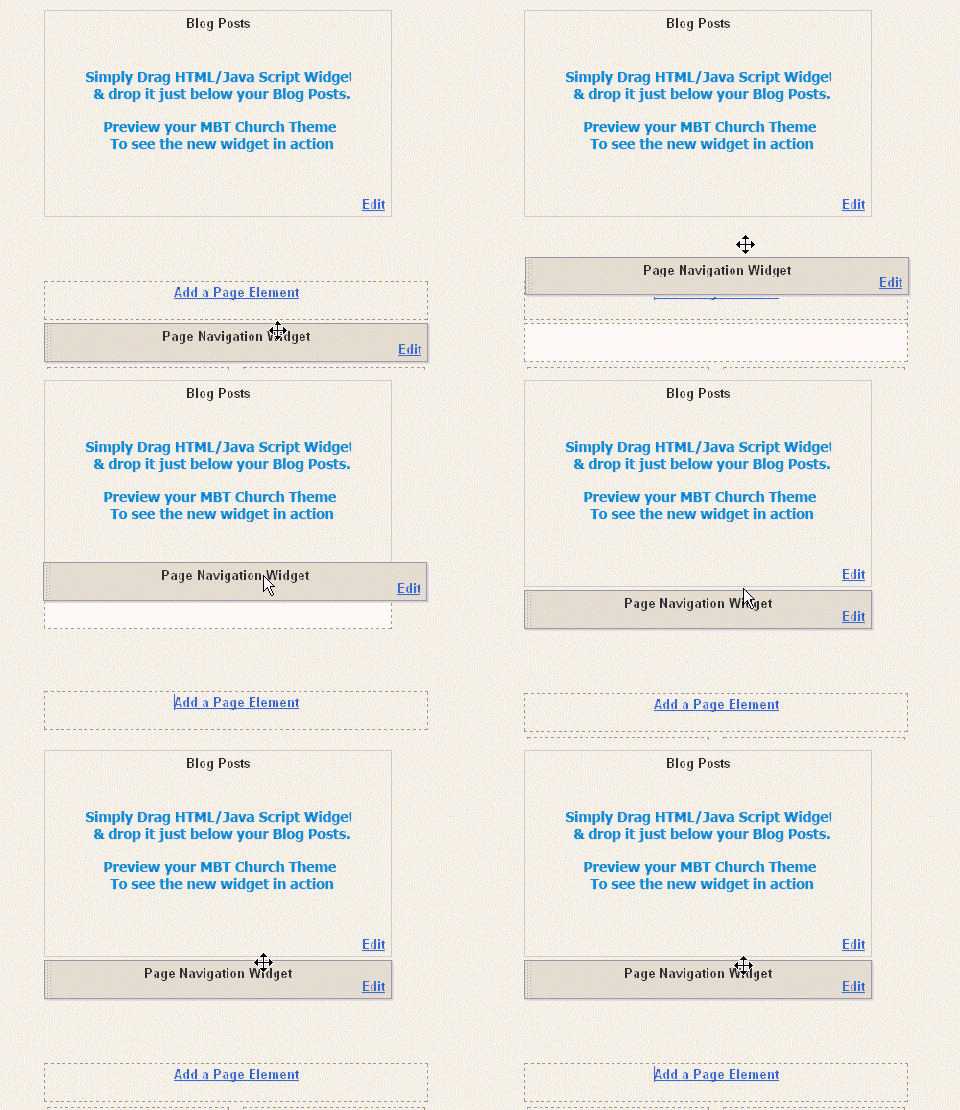
  • Once you have pasted the code inside the widget, simply drag your HTML/Javascript widget to the area just below your posts and drop it there, as shown in the picture below,
  • Page-Navigation-Widget-For- blogspot blogs


    That’s All!

    Hope you enjoyed it. Let me know if anything is unclear.

    Source: http://www.mybloggertricks.com/2009/09/stylized-page-navigation-widget-for.html

    Remarkably Beautiful Social Bookmarking Icons and Buttons! The Largest Collection Ever!!


    3.  Aquaticus Social Icon by Quake9

    Aquaticus Social-192

    download now


    4.  Cute Heart Social Icons by www.smashingmagazine.com 

    Cute Heart Icons

    download now


    5.  Cubic Social Icons with Logos at top by www.webfruits.it

    maxiconeblog3_lp

     download now

    6.  Twitter Boys with Attitude by monkeyworks

    Right Click and then select Save Image As/Save Link As To Download the Twitter Boys below,

    twitter3

    download now

    7. The Leaves Fall: A Social Icon Set By www.smashingmagazine.com

    the leaves fall

     download now


    8.  some Glassy Social Icons by vikiworks.com

    socialbookmark

    download now


    9.   33 Feed Icons by www.zeusboxstudio.com

    zeus

    download now

    10. Twitter Icons by www.vincentabry.com

    To download or view  Tweet Icons other than the ones given below Click Here

    Right Click and then select Save Image As/Save Link As To Download the Twitter Icons below,


    11.  Cute Animal Feed Icons by www.smashingmagazine.com 
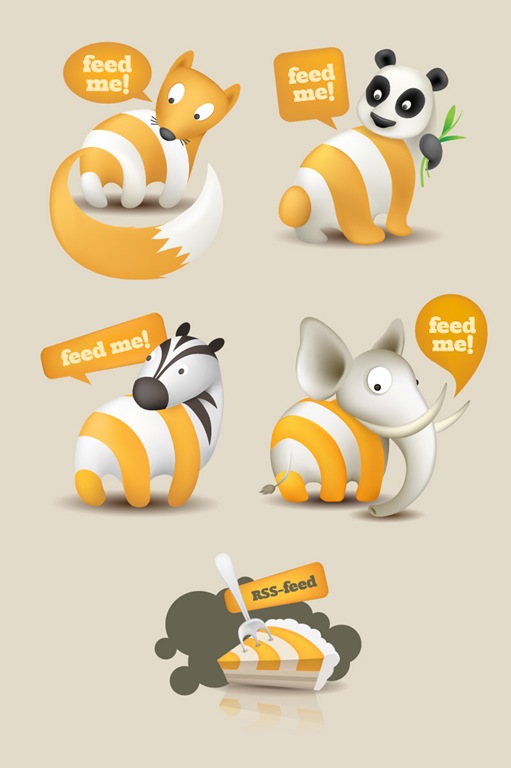
    Feed me animals

    download now


    13.  RSS Buttons by iris-design.info

    Right Click and then select Save Image As/Save Link As To Download the buttons below,

    image027 image021 image023 image025


    14.  Animated RSS Feed Icons by abdussamad.com

    Right Click and then select Save Image As/Save Link As To Download the Icons below,

    feed-icon-animated black-feed-icon feed-icon


    15. Beautiful Social balls by www.zeusboxstudio.com
    social balls
    download now
    16. Cheers Icon set by www.smashingmagazine.com

    cheers

    download now
    17.  Metallic Steel Social Icons by Webtreats.mysitemyway.com

    35__620x620_iconsetc-social-media-icons

    download now
    18.  Now Finally Some Jumbo size RSS Feed Icons by 0at.org 

    To Download Several other Feed Icons like the ones below, Click Here! 

    Right Click and then select Save Image As/Save Link As To Download the Icons below,


    154218d4  Thanks God! The Post ended at last. I am really tired at the moment, will meet you after taking some rest. But you guys do let me know whether TNT by STC’s this post on Social Bookmarking Icons was useful or not.

    Source: http://www.mybloggertricks.com/2009/05/remarkably-beautiful-social-bookmarking.html

    Contact Mohammad Mustafa Ahmedzai


    The Contact Form has been shifted to this page » Contact Mohammad

    Source: http://www.mybloggertricks.com/2009/03/contact-me.html

    Blogger Tips and Tricks

    Before Applying Any trick Do The Following:

    Read:

    1. What is a Blog and how to create a blog?
    2. WordPress or Blogger – Which One Is The Best? Unique

    Download:

    1. Windows Live Writer. The only editor that will give your posts a professional touch plus will help you blog offline!
    2. MBT HTML Editor. Learn CSS, HTML and JavaScript Online and Offline Unique

    Sign up for:

    1. To let users receive updates whenever you publish a new post, then you must sign up for Feedburner 

    Template Customization [CSS/HTML Tricks]

    • 25+ "Vertical" Navigation Menus for Blogger – CSS Tab Menus!  Unique
    • 30+ “Horizontal” Navigation Menus For Blogger With CSS & HTML Codes  Unique
    • Design a Professional Looking "About Us" Page Unique
    • Change Author Comments Color Style In Blogger
    • Add "Reply Link" to Blogger Comments
    • Make Clickable Images In Blogger with Fade Effect
    • How to add an ICON IMAGE next to a Hyperlink?
    • Add Icons Next To Hyperlinks Using CSS3
    • Hide Label Tags and Author Name In Blogger Posts
    • How to add Blogger Poll Widget To Posts?
    • Customize Blogger Comment Form – Make It Possible!
    • Remove Blogger Navigation Bar
    • Customize Blogger Navbar - Add It To Sidebar!
    • LOCK and UNLOCK Blogger Widgets
    • Style Post and Sidebar Titles With Google fonts In Blogger
    • Customized “Contact Me” Form Contact Me Email Form - The Best You Can Have
    • How To Customize “Block quotes” In Blogger With Mouse Hover Effect – The Blinking Bulb!
    • 14 Amazing Examples To Customize Blockquote Style In Blogger!
    • Block quote CSS Examples With Auto Number List –The Notebook Diary!
    • Top 10 Widely Used Image Hover Effects In Blogosphere!
    • How to Customize Each Sidebar Header Differently?
    • Show / Display Skype Emoticons In Blogger Comment Form
    • How To Use Google Fonts In Blogger? Part-1
    • Add Drop Shadows to Images and Expand them on Mouse Hover
    • Creating Customized HTML Text Area Boxes
    • Customize Author Profile In Blogger
    • 6 Easy Ways To Customize Heading Style In Blogger & Wordpress – Customize Heading Tags
    • Customize Bullet List Style With Image Hover Effect In Blogger
    • Customize Bullet List and Number list Using Hover Effect
    • Multi-Color Link Hover Effect
    • Learn How To Add Image Pop-Up And Opacity Effect To Blogger Images
    • Show Guest Author Info Below Blogger Posts
    • How To Add Animated Favicon In Blogger?
    • How to Show and Hide Widgets in Blogger?
    • Hide Read More Link In Blogger Static Pages
    • How To Use Special Keyboard Characters In Comments and Profile Status?

    Optimization Tips

    • Make Homepage Title Appear After Post Title in Blogger
    • How To Inter-link Pages Smartly To Flow The PR Juice To Ever Single Page!
    • How To Solve Google Sitemap Feed Proxy Errors – One Tip Solution
    • Best SEO TOOLS To Optimize Your Blog – All in One!
    • Why My Meta Description Appears in All Search Results?
    • Let Search Engines and Visitors Enjoy Your Blog Posts! – How To?
    • How To Write Search Engine Friendly Blog Post Titles?
    • Is Directory Submission a Waste of Time?
    • Google Crawls This Blog Every Minute!
    • Surprisingly MBT Blog Finally added to DMOZ Directory! Learn How To Get Listed
    • Importance Of Post Title Limit In The Eyes Of Search Engines
    • How to link text and Image in Blogger posts?
    • 12 Useful Tips To Reduce Your Blog Load Time

    Monetization Tips

    • How To Style BuySellAds Empty Ad Spots With CSS?
    • Best Adsense Ad Locations & Ad Formats To Earn Handsome Revenue
    • Top 7 Recommended Ways to Make Money Online
    • How To Use PayPal In Iran, Egypt and Pakistan?
    • PayPal Now a Problem For Indian Users!
    • How To Add Adsense Anywhere in Blog Posts?
    • 5 Easy Ways to Make Money from Your Blog

    Blogging Tips

    • Why I Blog?
    • Make Mobile Version Of Your Blogger Blogs For Mobile Devices - Surprise!
    • A Must Follow 3 Meal Diet Plan for Bloggers
    • 8 Time Management Tips for Bloggers - How Crucial it is?
    • Anyone Can Earn Online and Be a Blogger, Just Go For it! Part 1
    • 7 Advantages Of Using Facebook Comments Box
    • Macbook Pro - Every Bloggers Dream
    • How To Create a Google Profile Page?
    • What it takes to become a Humble Blogger?
    • Photoshop Image Editing Basics For Bloggers
    • How To Make a Mobile Version Of a Blog?

    Social Media

    • Top Ten Facebook Applications 2011
    • Zuckerberg Wants Kids To Use Facebook
    • FaceBook Addiction Disorder - The 9 Symptoms
    • Top Ten Reasons Why I can't Stop Using Facebook?
    • How to Customize Layout of Facebook Profile Page?
    • How To Do Mobile Blogging Using Android Phone?

    Icons and Buttons

    • Window Style Social Bookmarking Icons Set – Best Gift To Bloggosphere!
    • Download Facebook Style Bookmarking Buttons
    • Presenting The Animated Social Bookmarking Icons Set – The Flapper
    • Social Media Reshaped! Introducing Mind Blowing Circular Style Social Bookmarking Icons Set
    • Trigonal Style Social Media Icons Set – A must for every Blog!
    • Remarkably Beautiful Social Bookmarking Icons and Buttons! The Largest Collection Ever!!
    • Blinking Read More Buttons For Blogger- With a Tiny Arrow!
    • Change Newer Posts, Older Posts and Home Links With Cute Images
    • Replace Newer, Older And Home Links With Shiny Buttons In Blogger
    • Attractive Animated Read More Buttons For Blogger With Stylish Arrow Nose!
    • Attractive Read More Button Images For Blogger|Blogspot blogs –Arrow Head
    • 125 by 125 Animated Ad Banners For Blogs – Biggest Advertising Collection Ever!
    • Free High Quality Flash Clocks For Your Blogs With No Adds At All!
    • Show Onion Emoticons in blogger posts

    Traffic Tips

    • How To Compare Websites’ Traffic?
    • How To Make a Video Popular In YouTube?
    • Publish Several Posts Per Day To Boost Traffic!
    • How To Drive Traffic To Your Blogs From Facebook?
    • Broadcast Your Blogs on YouTube To Increase Traffic Significantly!

    Multi Media

    • Play Mp3 in BlogSpot using a WordPress audio Player, the best Mp3 player You Can Have! 
    • Customize The Color Scheme Of Wordpress Mp3  Player  Unique
    • Editing The Song or Track Title and Artist Name In Blogger-Wordpress Mp3 Player

    Bugs and Errors

    • Newer, Older, Home Links Not Visible In Blogger
    • How To Find the "Edit HTML" Option in New Blogger Dashboard?
    • How To Delete Blogger Comments –Trash Icon Bug fixed!
    • IE8 Website Operation Aborted Error Finally Solved!
    • Disadvantages Of "Blogger Template Designer" Templates

    Windows Live Writer

    • Windows Live Writer 2011 Amazing Features
    • Offline Blogging With Windows Live Writer
    • Use Windows Live Writer & Kick Blogger Editor!
    • Windows Live Writer Keyboard Shortcuts
    • Blogger Post Editor Keyboard Shortcuts

    Miscellaneous

    • How To Put Your Blog Name In "AddThis" Menu?
    • Play Flash SWF Files In Blogger - My First Flash Movie!
    • Top Ten Things I Hate About Blogger
    • Amazing Google Blogger Features & Look In 2011!!
    • Free High Quality Flash Clocks For Your Blogs With No Ads At All!
    • Direct Linking To Picasa Images. Who Says You Can’t Store-Save-Upload Animated Images in Blogger
    • Create Blogger Backup For Images And Get Image URLs
    • My Experience of ACM-NUCES (FAST) – Developer’s Day 2011
    • Google And DMOZ’s Warm Welcome And My Activities During The Long Break
    • Earn $20 Dollars Plus 300 Free EntreCard Credits!!
    • Get a free Photo bucket
    • EntreCard Buckets –Amazing Traffic Resource!
    • How To track Downloads On your Website?
    • Facebook and YouTube Banned in Pakistan For Promoting “Draw Mohammad Day” !!
    • Surprisingly MBT Blessed With Page-Rank 3.0!!
    • Can Google Be A Threat In Near Future?
    • Free Hot linking for your files, play flash, JavaScript, Mp3… any file!! 
    • Speedup Mozilla Firefox, Make it Faster, Much Faster!!
    • Customize XP's Appearance And Sound Scheme
    • Remove Shortcut Arrows From Desktop Icons Plus Make Icon Labels Transparent
    • Shutdown and Restart WindowsXP In Seconds!
    • Change XP Desktop Icons Into a tidy Small List View
    • How should You Use an Anti-Virus in an Intelligent and Effective Way?
    • From Uppercase to Lowercase, Change Capital Letters To Small and Vice Versa
    • SPEEDUP YOUR COMPUTER (Part 1)
    • SPEEDUP YOUR COMPUTER (Part2)

    Copyright © 2011. All rights reserved by “My Blogger Tricks .Com”

    Source: http://www.mybloggertricks.com/2008/03/blogger-tips-and-tricks.html

    MESSAGE NOTIFIER


    Congratulation! Your message is received successfully.


    Thank you for taking time and writing to us. We will respond to your email as soon as possible. Till then enjoy reading MBT Blogger Tutorials

    Source: http://www.mybloggertricks.com/2008/04/message-received-notifier.html
     
    Play : Agame | Y8 Games | Y3 Games
    Copyright © 2011. Blogger Tips And Tricks 2012 - All Rights Reserved

    Proudly powered by Blogger