How To Use Google Fonts In Blogger? Part-1


Read Part-2 here -> [a href="http://www.mybloggertricks.com/2011/05/style-post-and-sidebar-titles-with.html" target="_blank"]Style Post Titles and Sidebar titles With Google fonts in Blogger[/a]

Google Font-Previewer-Tricks It is no wonder that web technology has developed tremendously over the recent years. Fonts that were once stored in user’s computers are now embedded in templates. Few years back you could use only those fonts in your templates which were available on major operating systems and in order to view those stylish fonts on your websites, the user should already had fonts installed on their PCs. Today you can use any font you like for your designing purposes and the reader doesn’t need having those fonts installed on his PC. Thanks to [a href="http://code.google.com/apis/webfonts/" target="_blank"]Google Fonts API[/a] you can now embed any font you like in your templates out of the popular fonts available at Google Font Directory.

Google Font Previewer Tricks

For making things as simple as possible I would first discuss in detail some important things about this excellent Font Previewer tool provided by Google itself. We will use this tool to produce our desired embeddable code and CSS code. For this reason I have divided this article in two parts. Part- 1 will let you know how to properly use [a href="http://code.google.com/webfonts/preview#font-family=Lobster" target="_blank"]Google Font Previewer[/a] and Part- 2 will involve the use of these fonts in different parts of your Blogger template so keep track of both parts.

This is how Google Font Previewer looks like,

[a href="http://code.google.com/webfonts/preview#font-family=Allan" rel="Google font previewer" target="_blank"]google-font-previewer[/a] 
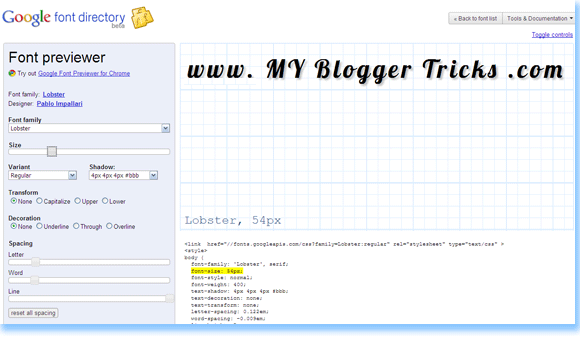
As you can see that there is a Tools menu at your left and the display at right. You set the options to create your custom font. You can change everything through this tool except the color. Once you have set your preferred text you just need to copy the embedding code which appears below the display like this,

<link  href="//fonts.googleapis.com/css?family=Lobster:regular" 


rel="stylesheet" type="text/css" >


This embedding code can be edited in many ways to make the text appear bold, regular or italic  but when you have CSS then why bother disturbing the HTML? :)


and just below this code appears the CSS code which looks like this,


<style>
body {
font-family: 'Lobster', serif;
font-size: 36px;
font-style: normal;
font-weight: 400;
text-shadow: none;
text-decoration: none;
text-transform: none;
letter-spacing: 0em;
word-spacing: 0em;
line-height: 1.2;

}
</style>


The blue part is what that will be used in Part- 2 of this tutorial. This CSS code is the most important part and even if you don’t use the Google Font Previewer you can easily customize the Custom Font using this CSS. Now how would you use these custom fonts in blogger? So create your custom Font with your preferred look and feel and keep the embeddable code and blue part for Part- 2.


How To Embed Google custom Fonts in Blogger?


The method is simple. Do this,


  1. Go To Blogger > Design > Edit HTML


  2. Backup your Blogger Templates


  3. Search for </head>


  4. Just above it paste the embeddable code that you copied from Font Previewer with one adjustment. By default the embeddable code ending tag is not closed and it looks like this,


<link  href="//fonts.googleapis.com/css?family=Lobster:regular" 


rel="stylesheet" type="text/css" >


You must add a back slash at the end like this,


<link  href="//fonts.googleapis.com/css?family=Lobster:regular" 


rel="stylesheet" type="text/css" />


You can add as many embeddable fonts as you wont. You just need to end each code with a closing tag.


Now how would you use this font in Blogger posts, titles, block quotes, sidebars, headers, footers and how would you further customize the font, all this will be shared in Part –2 so keep in touch. I have shared below the embeddable codes of some of the best fonts available which will be required in Part –2. The list below will help you use the best fonts for yourself and would save your time too. So here we go,


1.  Fontdiner Swanky    


image


<link  href="//fonts.googleapis.com/css?family=Fontdiner+Swanky:regular" 


rel="stylesheet" type="text/css" />


2.  Geo    



image


<link  href="//fonts.googleapis.com/css?family=Geo:regular" 


rel="stylesheet" type="text/css" />


3.  Homemade Apple


image


<link  href="//fonts.googleapis.com/css?family=Homemade+Apple:regular" 


rel="stylesheet" type="text/css" />


4.  UnifrakturCook



image


<link  href="//fonts.googleapis.com/css?family=UnifrakturCook:regular" 


rel="stylesheet" type="text/css" />


5.  Irish Growler


image


<link  href="//fonts.googleapis.com/css?family=Irish+Growler:regular" 


rel="stylesheet" type="text/css" />


6.  Orbitron


image


<link  href="//fonts.googleapis.com/css?family=Orbitron:regular" 


rel="stylesheet" type="text/css" />


7.  Permanent Marker



image


<link  href="//fonts.googleapis.com/css?family=Permanent+Marker:regular" 


rel="stylesheet" type="text/css" />


8.  Rock Salt


image


<link  href="//fonts.googleapis.com/css?family=Rock+Salt:regular" 


rel="stylesheet" type="text/css" />


9.  Slackey



image


<link  href="//fonts.googleapis.com/css?family=Slackey:regular" 


rel="stylesheet" type="text/css" />


10. Sniglet



image


<link  href="//fonts.googleapis.com/css?family=Sniglet:regular" 


rel="stylesheet" type="text/css" />


11. Tangerine



image


<link  href="//fonts.googleapis.com/css?family=Tangerine:regular" 


rel="stylesheet" type="text/css" />


12. Kenia


image


<link  href="//fonts.googleapis.com/css?family=Kenia:regular" 


rel="stylesheet" type="text/css" />


13. Kranky



image


<link  href="//fonts.googleapis.com/css?family=Kranky:regular" 


rel="stylesheet" type="text/css" />


14. Lobster



image


<link  href="//fonts.googleapis.com/css?family=Lobster:regular" 


rel="stylesheet" type="text/css" />


15. Luckiest Guy



image


<link  href="//fonts.googleapis.com/css?family=Luckiest+Guy:regular" 


rel="stylesheet" type="text/css" />


16. Mountains of Christmas


image


<link  href="//fonts.googleapis.com/css?family=Mountains+of+Christmas:regular" 


rel="stylesheet" type="text/css" />


17. IM Fell English SC


image


<link  href="//fonts.googleapis.com/css?family=IM+Fell+English+SC:regular" 


rel="stylesheet" type="text/css" />


18. Allerta Stencil


image


<link  href="//fonts.googleapis.com/css?family=Allerta+Stencil:regular" 


rel="stylesheet" type="text/css" />


19. Cherry Cream Soda


image


<link  href="//fonts.googleapis.com/css?family=Cherry+Cream+Soda:regular" 


rel="stylesheet" type="text/css" />


20. Chewy


image


<link  href="//fonts.googleapis.com/css?family=Chewy:regular" 


rel="stylesheet" type="text/css" />


21. Coda


image


<link  href="//fonts.googleapis.com/css?family=Coda:regular" 


rel="stylesheet" type="text/css" />


22. Coming Soon


image


<link  href="//fonts.googleapis.com/css?family=Coming+Soon:regular" 


rel="stylesheet" type="text/css" />


  23. Covered By Your Grace


image


<link  href="//fonts.googleapis.com/css?family=Covered+By+Your+Grace:regular" 


rel="stylesheet" type="text/css" />


24. Droid Serif


image


<link  href="//fonts.googleapis.com/css?family=Droid+Serif:regular" 


rel="stylesheet" type="text/css" />


25. Corben



image


<link  href="//fonts.googleapis.com/css?family=Corben:regular" 


rel="stylesheet" type="text/css" />


If you found anything unclear till now so please feel to post your question. The next part is more interesting so make sure you have [a href="http://feedburner.google.com/fb/a/mailverify?uri=TntByStc" target="_blank"]subscribed to our Updates[/a]. Till then Take care! :)


Source: http://www.mybloggertricks.com/2011/01/how-to-use-google-fonts-in-blogger-part.html

How to Customize Each Sidebar Header Differently?

How To Find out Unique ID Name of each Blogger Widget?

Simply follow these steps,

  1. Log into your [a href="http://blogger.com" target="_blank"]Blogger[/a] Account
  2. And click the link that says  View your Blog
  3. At your Blog below each widget you will find this Edit key image,Blogger Edit-key
  4. Hover your mouse cursor on it and right Click and choose Copy Link Location
  5. The link will look something like this,

http://www.blogger.com/rearrange blogID=#####&widgetType=HTML&widgetId=HTML4&action=editWidget

Copy your Widget ID and keep it save as it will be used in the next part. In my case you can easily see that the widget Id is HTML4

HTML/JavaScript widgets are usually assigned such ID’s as HTML1, HTML2, HTML3 and so on.

About me widget will have an ID like Profile1 and Link lists widgets have Ids as LinkList1, LinkList2 etc.

The ID’s are case sensitive so use them as they appear.

How to Customize a Widget using its Unique ID?

Now here comes the interesting part. We will now customize the Widget’s Heading Style i.e H2 tag. Customization of other portions of the Widget will be shared in future posts.

  1. Go To Blogger > Design > Edit HTML
  2. Backup your template
  3. Search for ]]></b:skin>
  4. Paste the following code just above ]]></b:skin> ,

#ID h2{
background:#575656;
margin:10px 0 10px 0;
padding:8px 0 8px 10px;
font-size:12px;
font-family: Sans-serif, Arial, Helvetica;
font-weight:bold;
text-transform:uppercase;
color:#ffffff; text-shadow:0 1px 0 #fff;
}


Now replace ID with your unique widget ID. To change the background color change #575656 and to change the Font colour change #ffffff. May be you will like using our [a href="http://www.mybloggertricks.com/2008/01/color-code-generator-and-color-wheel.html" target="_blank" rel="Colour Code Generator Tool"]Colour Code Generator Tool[/a]

   5. Hit save and you are Done!

View your blog to see the new dress :)

Hope you find it useful and worth trying. More interesting CSS tricks on it will be shared soon InshAllah.

Note: Kindly respect Copyrights. Most of our tricks are being duplicated without attaching any credits and this really destroys our efforts. It’s a request from all our readers to respect the content of the original author.

Source: http://www.mybloggertricks.com/2011/01/how-to-customize-each-sidebar-header.html

Hide Read More Link In Blogger Static Pages

Read-More-Button The [a href="http://www.mybloggertricks.com/2009/05/add-read-more-link-to-your-posts-expand.html" target="_blank" rel="Add read more link to Blogger"]Read More link tutorial[/a] that I previously shared summarizes all posts to a specified length but then it even appears on Blogger’s newly introduced Static Pages where it should not be. I was scratching my head on how to solve this problem when [a href="http://www.blogger.com/profile/13597329800723396260" target="_blank"]Sam[/a] of [a href="http://www.plentyofebooks.net/" target="_blank"]Plenty Of E-books[/a] came to my rescue. He provided me with a code that shortens posts and also doesn’t let the read more link or button to appear on static pages. So lets replace our old code with this more updated one.

Note:- If you have never implemented this trick before then kindly read this tutorial first –> [a href="http://www.mybloggertricks.com/2009/05/add-read-more-link-to-your-posts-expand.html" target="_blank" rel="Add Read More Link To Your Posts"]Add Read More Link To Your Posts[/a]


How To Summarize Posts and Hide Read More Link in Static Pages?

  1. Go To [a href="http://blogger.com" target="_blank"]Blogger[/a] > Design > Edit HTML
  2. Backup your template
  3. Search for the old read more code which looks like this,

<b:if cond='data:blog.pageType != "item"'>
<a expr:href='data:post.url'>

<div style="text-align: right;">Read More ->></div></a>
</b:if>


or something similar to this. Simply replace it with this one,

<!--READ-MORE-STARTS-->
<b:if cond='data:blog.pageType == &quot;static_page&quot;'><br/>
<b:else/>
<b:if cond='data:blog.pageType == &quot;index&quot;'><br/>
<a expr:href='data:post.url'><div style='text-align: right;'>
<img height='33px' src='IMAGE URL OF READ MORE BUTTON' width='120px'/></div>
</a>
</b:if>
</b:if>
<!--READ-MORE-STOPS-->


kindly replace IMAGE URL OF READ MORE BUTTON with Image link of your read more button. If you don’t have a button then grab one from some of the buttons I designed in past,

Visit these links,

  • [a href="http://www.mybloggertricks.com/2009/09/blinking-read-more-buttons-for.html" target="_blank" rel="Blinking Read More Buttons"]Blinking Read More Buttons[/a]
  • [a href="http://www.mybloggertricks.com/2009/09/attractive-animated-read-more-buttons.html" target="_blank" rel="Animated Read More Buttons"]Animated Read More Buttons[/a]
  • [a href="http://www.mybloggertricks.com/2009/09/attractive-read-more-button-images-for.html" target="_blank" rel="Arrow Head Read More Buttons"]Arrow Head Read More Buttons[/a]


Save your template and view your static Page to see it working just perfect! Peace :)

Source: http://www.mybloggertricks.com/2011/01/hide-read-more-link-in-blogger-static.html

Is Directory Submission a Waste of Time?

Hope you may understand my point and may take mature steps in making your Blog a place where readers may find comfort. Do let me know about any interesting story that you may wish to share with all of us. Peace and blessings :)

Source: http://www.mybloggertricks.com/2011/01/is-directory-submission-waste-of-time.html

Earn $20 Dollars Plus 300 Free EntreCard Credits!!

I have Uploaded My Niece's Sample Home Video. Hope you will like it.
Source: http://www.mybloggertricks.com/2011/01/earn-20-dollars-plus-300-free-entrecard.html

How To Drive Traffic To Your Blogs From Facebook?

After creating the [a target="_blank" href="http://www.mybloggertricks.com/2009/08/introducing-mind-blowing-circular-style.html"]Circular Style[/a] and [a target="_blank" href="http://www.mybloggertricks.com/2009/08/releasing-gorgeous-mbt-social-media.html"]Trigonal Style[/a] Social Bookmarking Icons, I decided why not create some animated social media icons set, which may look professional, eye-catching and yet unique! I am excited to have successfully published our third Icon set which is different in every aspect. See it for yourselves. Hover your mouse cursor over the icons below to see the flapping effect.


The download file below contains The Flapper Icons Set. All these icons are available in png format and in sizes 32px, 48px, 64px and 128px.

[a target="_blank" href="http://dstats.net/download.php?file=http://sites.google.com/site/mybloggertricks/Home/THEFLAPPER.rar?attredirects=0"][/a]

Downloads: [a href="http://dstats.net/download.php?file=http://sites.google.com/site/mybloggertricks/Home/THEFLAPPER.rar?attredirects=0"][/a]


To add these icons to your blogs, websites, forums etc use the respective codes below,

<!-- DELICIOUS CODE STARTS -->
<img width="" height="" onmouseover="this.src='https://blogger.googleusercontent.com/img/b/R29vZ2xl/AVvXsEhZK8Sx3-UPLx39jb3xA_VX5Ypn7O8_Jj4gWZQ8LH57FGpzOKuP7z1m5dQ3X17latY3NAJ2dLjg-H0dU70Ssm3VZUB8RlIr8M_lYsa5NJu_mhBh7WZhPtJ1pVK3ojsm_0tNCxuTT52AkW0/s400/DELICIOUS1.png'" src="https://blogger.googleusercontent.com/img/b/R29vZ2xl/AVvXsEjNeBSmcojunxQQwgdbWP1JNLwOT4YJCb7uXIdSLUTllRC_QnrPd2lcubB_9RnSsDkggUhnvgWUUDN3vl9ibgf60a6tY3NX2ziLMh62tUlwJkqXjQLkVgmhLK8i8Fl-URxA7FOqGsPVdGc/s400/DELICIOUS2.png" onmouseout="this.src='https://blogger.googleusercontent.com/img/b/R29vZ2xl/AVvXsEjNeBSmcojunxQQwgdbWP1JNLwOT4YJCb7uXIdSLUTllRC_QnrPd2lcubB_9RnSsDkggUhnvgWUUDN3vl9ibgf60a6tY3NX2ziLMh62tUlwJkqXjQLkVgmhLK8i8Fl-URxA7FOqGsPVdGc/s400/DELICIOUS2.png'"/>
<!-- DELICIOUS CODE ENDS -->

<!-- RSS CODE STARTS -->
<img width="" height="" onmouseover="this.src='https://blogger.googleusercontent.com/img/b/R29vZ2xl/AVvXsEj5I8A815qAhe_TpHoZ0Qz4Niwn7TCcrcGxvpPjCxuF7W2hRHPXK6bt8B9-mVgBWKODkdbnGp6a622F5AYCagbOvKvy-oNxyrEd1QaDIZyGJ_VDzzhkSFMMETc89YK89wU52SzVGhb4pTI/s400/RSS1.png'" src="https://blogger.googleusercontent.com/img/b/R29vZ2xl/AVvXsEiA4w0d4SWYa7_PND71s9FwAdSq79Xje7U081aeOXttI01Lq8751lhJf_tzoqpwcBUBQeuwHBYW-TIzgpiYrpELSkiwhFLyTwA-TmiV2zAT9ihIfjgnwy4gm5HpbCM-TdViZnsM9vuN-i8/s400/RSS2.png" onmouseout="this.src='https://blogger.googleusercontent.com/img/b/R29vZ2xl/AVvXsEiA4w0d4SWYa7_PND71s9FwAdSq79Xje7U081aeOXttI01Lq8751lhJf_tzoqpwcBUBQeuwHBYW-TIzgpiYrpELSkiwhFLyTwA-TmiV2zAT9ihIfjgnwy4gm5HpbCM-TdViZnsM9vuN-i8/s400/RSS2.png'"/>
<!-- RSS CODE ENDS -->

<!-- YOUTUBE CODE STARTS -->
<img width="" height="" onmouseover="this.src='https://blogger.googleusercontent.com/img/b/R29vZ2xl/AVvXsEgwz3x5VQE4aSohugwQ_MYRuhGB6Qc7r4HNZe-aNATDEQ8RQX2ucahnQbY8GhnIqc_klMG4xX00q0AajtlTgz-tQkpkgsl1qy77xUmldhUJRhSsJN5aNIKS_HCWC3c8l_rTFLjxWyovMsU/s400/YOUTUBE1.png'" src="https://blogger.googleusercontent.com/img/b/R29vZ2xl/AVvXsEjbxEE9sbDbPvHDMYQ8NYuJ1zEKXC3rq3ryoOmpjUMBv9iYaTjDkfUAggVNG0lR2GtvlfWo6MK9Dr0RqcmfJ4PCGxVnOxFphOXMADjbjByqB0LboPXwgkv-mTcT-nGgHSxdB7hkZNCLI1M/s400/YOUTUBE2.png" onmouseout="this.src='https://blogger.googleusercontent.com/img/b/R29vZ2xl/AVvXsEjbxEE9sbDbPvHDMYQ8NYuJ1zEKXC3rq3ryoOmpjUMBv9iYaTjDkfUAggVNG0lR2GtvlfWo6MK9Dr0RqcmfJ4PCGxVnOxFphOXMADjbjByqB0LboPXwgkv-mTcT-nGgHSxdB7hkZNCLI1M/s400/YOUTUBE2.png'"/>
<!-- YOUTUBE CODE ENDS -->

<!-- YAHOO CODE STARTS -->
<img width="" height="" onmouseover="this.src='https://blogger.googleusercontent.com/img/b/R29vZ2xl/AVvXsEgJvE59Z206NAmsLS_yMmaeyCAbF1r2ZGZMLxR4nFFJypYWvBZYPlUcoUWs8zRnL86ylzozM1YDVe0Y08m7LH6WCuAoBCZue1-XajD5aUQ4bRDVBPk7oJ-z9ydc4CEW3kLvMbr0yB4VGQg/s400/YAHOO1.png'" src="https://blogger.googleusercontent.com/img/b/R29vZ2xl/AVvXsEgXVcaEfCAxB37GqJ9p2bgSYnW0Kx1AC2cTvgtuqHJke78VoDtuSaUOhkz6lX1igmImekuz7J4_rKWZP1K-oNAvp10NP0bRT6cSchvg9aWRe-jmoHywgWQ8-eEaA61ECJ5bqAWnlQPZPWQ/s400/YAHOO2.png" onmouseout="this.src='https://blogger.googleusercontent.com/img/b/R29vZ2xl/AVvXsEgXVcaEfCAxB37GqJ9p2bgSYnW0Kx1AC2cTvgtuqHJke78VoDtuSaUOhkz6lX1igmImekuz7J4_rKWZP1K-oNAvp10NP0bRT6cSchvg9aWRe-jmoHywgWQ8-eEaA61ECJ5bqAWnlQPZPWQ/s400/YAHOO2.png'"/>
<!-- YAHOO CODE ENDS -->

<!-- TWITTER CODE STARTS -->
<img width="" height="" onmouseover="this.src='https://blogger.googleusercontent.com/img/b/R29vZ2xl/AVvXsEjA1bzPBrJiqoiivbNaW56blQCkXKgvM6PHfhnAUYL87_c3dHXdjWsfYMJ9v0IWFAy9JRAeWOcq5CHSO3ytYuajfgH4As0MNE4uDhthbcW-ImYpObm_MP7L8r2YUDebDXkLg_QW3xlPhjk/s400/TWITTER1.png'" src="https://blogger.googleusercontent.com/img/b/R29vZ2xl/AVvXsEhkz47wmbZX2X7jtt8NzTSch9fKXunVNsXCrILRDkWg8XSnaLNilwc4xS1xrgEiImxhmgJosUb8hWwe-g-jbCEKYIpzZkaXFF9pZqLIMVXQh8kW1Qlha7N5OVY5qNfm1irXSm2YtafZ3dc/s400/TWITTER2.png" onmouseout="this.src='https://blogger.googleusercontent.com/img/b/R29vZ2xl/AVvXsEhkz47wmbZX2X7jtt8NzTSch9fKXunVNsXCrILRDkWg8XSnaLNilwc4xS1xrgEiImxhmgJosUb8hWwe-g-jbCEKYIpzZkaXFF9pZqLIMVXQh8kW1Qlha7N5OVY5qNfm1irXSm2YtafZ3dc/s400/TWITTER2.png'"/>
<!-- TWITTER CODE ENDS -->

<!-- TECHNORATI CODE STARTS -->
<img width="" height="" onmouseover="this.src='https://blogger.googleusercontent.com/img/b/R29vZ2xl/AVvXsEi7ztFifBgOFQM2-Zxi8KdaXureGgWLbi4-iLRocnUh9u-xKx93uTTtT1Wb8Ddd3q3RhE9O6BDVI8oC-A5BeQcBYSuJ1gC3xEz5GR8qF7jKkJVCipMGR2nz_nkwYWofOb7M-wI_w_QLqBw/s400/TECHNORATI1.png'" src="https://blogger.googleusercontent.com/img/b/R29vZ2xl/AVvXsEga5Gj8PK1KQ2Lcev4sTqoloGOzEcLxjaO_SisBuR4LaRXYegvwEO61YF1aG_NBNY17RyjhSEC3ysOP4oA7n2tOel4Eb0oTySjOyXv9cvsdircZDG8Qzax656AhHTDuEK8uf2zQJCnCN5Q/s400/TECHNORATI2.png" onmouseout="this.src='https://blogger.googleusercontent.com/img/b/R29vZ2xl/AVvXsEga5Gj8PK1KQ2Lcev4sTqoloGOzEcLxjaO_SisBuR4LaRXYegvwEO61YF1aG_NBNY17RyjhSEC3ysOP4oA7n2tOel4Eb0oTySjOyXv9cvsdircZDG8Qzax656AhHTDuEK8uf2zQJCnCN5Q/s400/TECHNORATI2.png'"/>
<!-- TECHNORATI CODE ENDS -->

<!-- REDDIT CODE STARTS -->
<img width="" height="" onmouseover="this.src='https://blogger.googleusercontent.com/img/b/R29vZ2xl/AVvXsEgUtf30UmikzUn5CUpx-N9C4cR1RLUQ5isCn9HyDKUMZGYT6NdnKSXO0c8D_TxGfYVwLW97QDdM0eC70Vfca1khT4l6iuf1LZhedY6f3Q05FoGOi47jh87vvypo7NXtUW6AQ7QpGNaSwCY/s400/REDDIT1.png'" src="https://blogger.googleusercontent.com/img/b/R29vZ2xl/AVvXsEjBlgqP5nhEjRVUmq4FjZp9F1pFwDoypOH2fQi42Doml1-KHYLI6nZPYQMuL9uolxzjKpoFGun6hvRZVnXvVwbPcePLglLmvgqH_9INC_QwDvkUjgA10kz6oC0uEjdgQ14AKMPKww71Jkc/s400/REDDIT2.png" onmouseout="this.src='https://blogger.googleusercontent.com/img/b/R29vZ2xl/AVvXsEjBlgqP5nhEjRVUmq4FjZp9F1pFwDoypOH2fQi42Doml1-KHYLI6nZPYQMuL9uolxzjKpoFGun6hvRZVnXvVwbPcePLglLmvgqH_9INC_QwDvkUjgA10kz6oC0uEjdgQ14AKMPKww71Jkc/s400/REDDIT2.png'"/>
<!-- REDDIT CODE ENDS -->

<!-- FACEBOOK CODE STARTS -->
<img width="" height="" onmouseover="this.src='https://blogger.googleusercontent.com/img/b/R29vZ2xl/AVvXsEjt0n8abE6JFUFd7iCuLNHAVaCTvIOID4EIE6TQQS8W0dy_xwrwcWabQ1t9TGaEjWf5SA-H_TePe4tHuxDeN5v2mxA4aQBnpILfB71gfSHQv-EUdQrpRltdYEC9tVXywbqhOIL8RJxgXG0/s400/FACEBOOK1.png'" src="https://blogger.googleusercontent.com/img/b/R29vZ2xl/AVvXsEj9MRrNld31JeFrLlThBbtahxoEQwko-DGagvCdFG8KL-LPQLR1Ao9nxb2V3KrtsZFGxyFO2uA4PTn6Mahcfc7tAvMVEttVZYrgTRD8TNigNYkSe1R_1jvc7WIIxpkAjL_YiPEIeE8ZtYI/s400/FACEBOOK2.png" onmouseout="this.src='https://blogger.googleusercontent.com/img/b/R29vZ2xl/AVvXsEj9MRrNld31JeFrLlThBbtahxoEQwko-DGagvCdFG8KL-LPQLR1Ao9nxb2V3KrtsZFGxyFO2uA4PTn6Mahcfc7tAvMVEttVZYrgTRD8TNigNYkSe1R_1jvc7WIIxpkAjL_YiPEIeE8ZtYI/s400/FACEBOOK2.png'"/>
<!-- FACEBOOK CODE ENDS -->

<!-- DIGG CODE STARTS -->
<img width="" height="" onmouseover="this.src='https://blogger.googleusercontent.com/img/b/R29vZ2xl/AVvXsEguGiIg26dKP-4iKVVjkJXdilw8y-B-LH5XGOxkw-kMGo-4odFxAJ_xbBD6RJKcvR8r6Viy_H6qzLzvQBvBd2cB828kb0XErpRGP989JSnrBB3-heC5eb1fFQwk3KwcwcJcy06jPWQx0ck/s400/DIGG1.png'" src="https://blogger.googleusercontent.com/img/b/R29vZ2xl/AVvXsEgtCeot84c-oOeaUqiIC11fgoJdrqjyPhBS8FytpNeLIYKptChtWPjGItwAIvvVoUIwinhJOsiqPhJbMwPm7YRC_yZPbFMf3ARVQNYkB4XSQHpVbFp9WuiUn6hImeHMvB3nvghxdCQBeY0/s400/DIGG2.png" onmouseout="this.src='https://blogger.googleusercontent.com/img/b/R29vZ2xl/AVvXsEgtCeot84c-oOeaUqiIC11fgoJdrqjyPhBS8FytpNeLIYKptChtWPjGItwAIvvVoUIwinhJOsiqPhJbMwPm7YRC_yZPbFMf3ARVQNYkB4XSQHpVbFp9WuiUn6hImeHMvB3nvghxdCQBeY0/s400/DIGG2.png'"/>
<!-- DIGG CODE ENDS -->

You can add these Flapper icons anywhere you like by copy-pasting the code for a specific Icon into your blogs and websites. The size of these images can be altered by giving width="" height="" some value. For example if you want to show icons of size 48px by 48px, then change the width and height as follow -> width="48px" height="48px" . The default icon size in the code above is 128px by 128px. Try to use any size less than 128px but not greater than that, else the icon will look blurry.

I will soon write a post on how to add these icons just below your blogspot posts. Further I am going to release a new Icon set soon, so make sure you subscribe and don't miss the next surprise!.

Any feedback is appreciated. Your comments is what I need as a token of favour :>

Source: http://www.mybloggertricks.com/2010/03/how-to-drive-traffic-to-your-blogs-from.html

Show / Display Skype Emoticons In Blogger Comment Form

After creating the [a target="_blank" href="http://www.mybloggertricks.com/2009/08/introducing-mind-blowing-circular-style.html"]Circular Style[/a] and [a target="_blank" href="http://www.mybloggertricks.com/2009/08/releasing-gorgeous-mbt-social-media.html"]Trigonal Style[/a] Social Bookmarking Icons, I decided why not create some animated social media icons set, which may look professional, eye-catching and yet unique! I am excited to have successfully published our third Icon set which is different in every aspect. See it for yourselves. Hover your mouse cursor over the icons below to see the flapping effect.


The download file below contains The Flapper Icons Set. All these icons are available in png format and in sizes 32px, 48px, 64px and 128px.

[a target="_blank" href="http://dstats.net/download.php?file=http://sites.google.com/site/mybloggertricks/Home/THEFLAPPER.rar?attredirects=0"][/a]

Downloads: [a href="http://dstats.net/download.php?file=http://sites.google.com/site/mybloggertricks/Home/THEFLAPPER.rar?attredirects=0"][/a]


To add these icons to your blogs, websites, forums etc use the respective codes below,

<!-- DELICIOUS CODE STARTS -->
<img width="" height="" onmouseover="this.src='https://blogger.googleusercontent.com/img/b/R29vZ2xl/AVvXsEhZK8Sx3-UPLx39jb3xA_VX5Ypn7O8_Jj4gWZQ8LH57FGpzOKuP7z1m5dQ3X17latY3NAJ2dLjg-H0dU70Ssm3VZUB8RlIr8M_lYsa5NJu_mhBh7WZhPtJ1pVK3ojsm_0tNCxuTT52AkW0/s400/DELICIOUS1.png'" src="https://blogger.googleusercontent.com/img/b/R29vZ2xl/AVvXsEjNeBSmcojunxQQwgdbWP1JNLwOT4YJCb7uXIdSLUTllRC_QnrPd2lcubB_9RnSsDkggUhnvgWUUDN3vl9ibgf60a6tY3NX2ziLMh62tUlwJkqXjQLkVgmhLK8i8Fl-URxA7FOqGsPVdGc/s400/DELICIOUS2.png" onmouseout="this.src='https://blogger.googleusercontent.com/img/b/R29vZ2xl/AVvXsEjNeBSmcojunxQQwgdbWP1JNLwOT4YJCb7uXIdSLUTllRC_QnrPd2lcubB_9RnSsDkggUhnvgWUUDN3vl9ibgf60a6tY3NX2ziLMh62tUlwJkqXjQLkVgmhLK8i8Fl-URxA7FOqGsPVdGc/s400/DELICIOUS2.png'"/>
<!-- DELICIOUS CODE ENDS -->

<!-- RSS CODE STARTS -->
<img width="" height="" onmouseover="this.src='https://blogger.googleusercontent.com/img/b/R29vZ2xl/AVvXsEj5I8A815qAhe_TpHoZ0Qz4Niwn7TCcrcGxvpPjCxuF7W2hRHPXK6bt8B9-mVgBWKODkdbnGp6a622F5AYCagbOvKvy-oNxyrEd1QaDIZyGJ_VDzzhkSFMMETc89YK89wU52SzVGhb4pTI/s400/RSS1.png'" src="https://blogger.googleusercontent.com/img/b/R29vZ2xl/AVvXsEiA4w0d4SWYa7_PND71s9FwAdSq79Xje7U081aeOXttI01Lq8751lhJf_tzoqpwcBUBQeuwHBYW-TIzgpiYrpELSkiwhFLyTwA-TmiV2zAT9ihIfjgnwy4gm5HpbCM-TdViZnsM9vuN-i8/s400/RSS2.png" onmouseout="this.src='https://blogger.googleusercontent.com/img/b/R29vZ2xl/AVvXsEiA4w0d4SWYa7_PND71s9FwAdSq79Xje7U081aeOXttI01Lq8751lhJf_tzoqpwcBUBQeuwHBYW-TIzgpiYrpELSkiwhFLyTwA-TmiV2zAT9ihIfjgnwy4gm5HpbCM-TdViZnsM9vuN-i8/s400/RSS2.png'"/>
<!-- RSS CODE ENDS -->

<!-- YOUTUBE CODE STARTS -->
<img width="" height="" onmouseover="this.src='https://blogger.googleusercontent.com/img/b/R29vZ2xl/AVvXsEgwz3x5VQE4aSohugwQ_MYRuhGB6Qc7r4HNZe-aNATDEQ8RQX2ucahnQbY8GhnIqc_klMG4xX00q0AajtlTgz-tQkpkgsl1qy77xUmldhUJRhSsJN5aNIKS_HCWC3c8l_rTFLjxWyovMsU/s400/YOUTUBE1.png'" src="https://blogger.googleusercontent.com/img/b/R29vZ2xl/AVvXsEjbxEE9sbDbPvHDMYQ8NYuJ1zEKXC3rq3ryoOmpjUMBv9iYaTjDkfUAggVNG0lR2GtvlfWo6MK9Dr0RqcmfJ4PCGxVnOxFphOXMADjbjByqB0LboPXwgkv-mTcT-nGgHSxdB7hkZNCLI1M/s400/YOUTUBE2.png" onmouseout="this.src='https://blogger.googleusercontent.com/img/b/R29vZ2xl/AVvXsEjbxEE9sbDbPvHDMYQ8NYuJ1zEKXC3rq3ryoOmpjUMBv9iYaTjDkfUAggVNG0lR2GtvlfWo6MK9Dr0RqcmfJ4PCGxVnOxFphOXMADjbjByqB0LboPXwgkv-mTcT-nGgHSxdB7hkZNCLI1M/s400/YOUTUBE2.png'"/>
<!-- YOUTUBE CODE ENDS -->

<!-- YAHOO CODE STARTS -->
<img width="" height="" onmouseover="this.src='https://blogger.googleusercontent.com/img/b/R29vZ2xl/AVvXsEgJvE59Z206NAmsLS_yMmaeyCAbF1r2ZGZMLxR4nFFJypYWvBZYPlUcoUWs8zRnL86ylzozM1YDVe0Y08m7LH6WCuAoBCZue1-XajD5aUQ4bRDVBPk7oJ-z9ydc4CEW3kLvMbr0yB4VGQg/s400/YAHOO1.png'" src="https://blogger.googleusercontent.com/img/b/R29vZ2xl/AVvXsEgXVcaEfCAxB37GqJ9p2bgSYnW0Kx1AC2cTvgtuqHJke78VoDtuSaUOhkz6lX1igmImekuz7J4_rKWZP1K-oNAvp10NP0bRT6cSchvg9aWRe-jmoHywgWQ8-eEaA61ECJ5bqAWnlQPZPWQ/s400/YAHOO2.png" onmouseout="this.src='https://blogger.googleusercontent.com/img/b/R29vZ2xl/AVvXsEgXVcaEfCAxB37GqJ9p2bgSYnW0Kx1AC2cTvgtuqHJke78VoDtuSaUOhkz6lX1igmImekuz7J4_rKWZP1K-oNAvp10NP0bRT6cSchvg9aWRe-jmoHywgWQ8-eEaA61ECJ5bqAWnlQPZPWQ/s400/YAHOO2.png'"/>
<!-- YAHOO CODE ENDS -->

<!-- TWITTER CODE STARTS -->
<img width="" height="" onmouseover="this.src='https://blogger.googleusercontent.com/img/b/R29vZ2xl/AVvXsEjA1bzPBrJiqoiivbNaW56blQCkXKgvM6PHfhnAUYL87_c3dHXdjWsfYMJ9v0IWFAy9JRAeWOcq5CHSO3ytYuajfgH4As0MNE4uDhthbcW-ImYpObm_MP7L8r2YUDebDXkLg_QW3xlPhjk/s400/TWITTER1.png'" src="https://blogger.googleusercontent.com/img/b/R29vZ2xl/AVvXsEhkz47wmbZX2X7jtt8NzTSch9fKXunVNsXCrILRDkWg8XSnaLNilwc4xS1xrgEiImxhmgJosUb8hWwe-g-jbCEKYIpzZkaXFF9pZqLIMVXQh8kW1Qlha7N5OVY5qNfm1irXSm2YtafZ3dc/s400/TWITTER2.png" onmouseout="this.src='https://blogger.googleusercontent.com/img/b/R29vZ2xl/AVvXsEhkz47wmbZX2X7jtt8NzTSch9fKXunVNsXCrILRDkWg8XSnaLNilwc4xS1xrgEiImxhmgJosUb8hWwe-g-jbCEKYIpzZkaXFF9pZqLIMVXQh8kW1Qlha7N5OVY5qNfm1irXSm2YtafZ3dc/s400/TWITTER2.png'"/>
<!-- TWITTER CODE ENDS -->

<!-- TECHNORATI CODE STARTS -->
<img width="" height="" onmouseover="this.src='https://blogger.googleusercontent.com/img/b/R29vZ2xl/AVvXsEi7ztFifBgOFQM2-Zxi8KdaXureGgWLbi4-iLRocnUh9u-xKx93uTTtT1Wb8Ddd3q3RhE9O6BDVI8oC-A5BeQcBYSuJ1gC3xEz5GR8qF7jKkJVCipMGR2nz_nkwYWofOb7M-wI_w_QLqBw/s400/TECHNORATI1.png'" src="https://blogger.googleusercontent.com/img/b/R29vZ2xl/AVvXsEga5Gj8PK1KQ2Lcev4sTqoloGOzEcLxjaO_SisBuR4LaRXYegvwEO61YF1aG_NBNY17RyjhSEC3ysOP4oA7n2tOel4Eb0oTySjOyXv9cvsdircZDG8Qzax656AhHTDuEK8uf2zQJCnCN5Q/s400/TECHNORATI2.png" onmouseout="this.src='https://blogger.googleusercontent.com/img/b/R29vZ2xl/AVvXsEga5Gj8PK1KQ2Lcev4sTqoloGOzEcLxjaO_SisBuR4LaRXYegvwEO61YF1aG_NBNY17RyjhSEC3ysOP4oA7n2tOel4Eb0oTySjOyXv9cvsdircZDG8Qzax656AhHTDuEK8uf2zQJCnCN5Q/s400/TECHNORATI2.png'"/>
<!-- TECHNORATI CODE ENDS -->

<!-- REDDIT CODE STARTS -->
<img width="" height="" onmouseover="this.src='https://blogger.googleusercontent.com/img/b/R29vZ2xl/AVvXsEgUtf30UmikzUn5CUpx-N9C4cR1RLUQ5isCn9HyDKUMZGYT6NdnKSXO0c8D_TxGfYVwLW97QDdM0eC70Vfca1khT4l6iuf1LZhedY6f3Q05FoGOi47jh87vvypo7NXtUW6AQ7QpGNaSwCY/s400/REDDIT1.png'" src="https://blogger.googleusercontent.com/img/b/R29vZ2xl/AVvXsEjBlgqP5nhEjRVUmq4FjZp9F1pFwDoypOH2fQi42Doml1-KHYLI6nZPYQMuL9uolxzjKpoFGun6hvRZVnXvVwbPcePLglLmvgqH_9INC_QwDvkUjgA10kz6oC0uEjdgQ14AKMPKww71Jkc/s400/REDDIT2.png" onmouseout="this.src='https://blogger.googleusercontent.com/img/b/R29vZ2xl/AVvXsEjBlgqP5nhEjRVUmq4FjZp9F1pFwDoypOH2fQi42Doml1-KHYLI6nZPYQMuL9uolxzjKpoFGun6hvRZVnXvVwbPcePLglLmvgqH_9INC_QwDvkUjgA10kz6oC0uEjdgQ14AKMPKww71Jkc/s400/REDDIT2.png'"/>
<!-- REDDIT CODE ENDS -->

<!-- FACEBOOK CODE STARTS -->
<img width="" height="" onmouseover="this.src='https://blogger.googleusercontent.com/img/b/R29vZ2xl/AVvXsEjt0n8abE6JFUFd7iCuLNHAVaCTvIOID4EIE6TQQS8W0dy_xwrwcWabQ1t9TGaEjWf5SA-H_TePe4tHuxDeN5v2mxA4aQBnpILfB71gfSHQv-EUdQrpRltdYEC9tVXywbqhOIL8RJxgXG0/s400/FACEBOOK1.png'" src="https://blogger.googleusercontent.com/img/b/R29vZ2xl/AVvXsEj9MRrNld31JeFrLlThBbtahxoEQwko-DGagvCdFG8KL-LPQLR1Ao9nxb2V3KrtsZFGxyFO2uA4PTn6Mahcfc7tAvMVEttVZYrgTRD8TNigNYkSe1R_1jvc7WIIxpkAjL_YiPEIeE8ZtYI/s400/FACEBOOK2.png" onmouseout="this.src='https://blogger.googleusercontent.com/img/b/R29vZ2xl/AVvXsEj9MRrNld31JeFrLlThBbtahxoEQwko-DGagvCdFG8KL-LPQLR1Ao9nxb2V3KrtsZFGxyFO2uA4PTn6Mahcfc7tAvMVEttVZYrgTRD8TNigNYkSe1R_1jvc7WIIxpkAjL_YiPEIeE8ZtYI/s400/FACEBOOK2.png'"/>
<!-- FACEBOOK CODE ENDS -->

<!-- DIGG CODE STARTS -->
<img width="" height="" onmouseover="this.src='https://blogger.googleusercontent.com/img/b/R29vZ2xl/AVvXsEguGiIg26dKP-4iKVVjkJXdilw8y-B-LH5XGOxkw-kMGo-4odFxAJ_xbBD6RJKcvR8r6Viy_H6qzLzvQBvBd2cB828kb0XErpRGP989JSnrBB3-heC5eb1fFQwk3KwcwcJcy06jPWQx0ck/s400/DIGG1.png'" src="https://blogger.googleusercontent.com/img/b/R29vZ2xl/AVvXsEgtCeot84c-oOeaUqiIC11fgoJdrqjyPhBS8FytpNeLIYKptChtWPjGItwAIvvVoUIwinhJOsiqPhJbMwPm7YRC_yZPbFMf3ARVQNYkB4XSQHpVbFp9WuiUn6hImeHMvB3nvghxdCQBeY0/s400/DIGG2.png" onmouseout="this.src='https://blogger.googleusercontent.com/img/b/R29vZ2xl/AVvXsEgtCeot84c-oOeaUqiIC11fgoJdrqjyPhBS8FytpNeLIYKptChtWPjGItwAIvvVoUIwinhJOsiqPhJbMwPm7YRC_yZPbFMf3ARVQNYkB4XSQHpVbFp9WuiUn6hImeHMvB3nvghxdCQBeY0/s400/DIGG2.png'"/>
<!-- DIGG CODE ENDS -->

You can add these Flapper icons anywhere you like by copy-pasting the code for a specific Icon into your blogs and websites. The size of these images can be altered by giving width="" height="" some value. For example if you want to show icons of size 48px by 48px, then change the width and height as follow -> width="48px" height="48px" . The default icon size in the code above is 128px by 128px. Try to use any size less than 128px but not greater than that, else the icon will look blurry.

I will soon write a post on how to add these icons just below your blogspot posts. Further I am going to release a new Icon set soon, so make sure you subscribe and don't miss the next surprise!.

Any feedback is appreciated. Your comments is what I need as a token of favour :>

Source: http://www.mybloggertricks.com/2010/03/show-display-skype-emoticons-in-blogger.html
 
Play : Agame | Y8 Games | Y3 Games
Copyright © 2011. Blogger Tips And Tricks 2012 - All Rights Reserved

Proudly powered by Blogger