Add a Cute Flying Twitter Bird To Your Blogs

flying-twitter-birdWith Twitter's worldwide popularity and with over 200 million users, generating 65 million tweets a day, it has become a must for every web master to use twitter sharing buttons and applications as much on his web as possible. This lets users to easily  tweet our blogs and websites which thereby generates traffic for us in return. Harish of [a href="http://www.way2blogging.org/2011/01/how-to-add-animated-flying-twitter-bird.html" target="_blank"]way2blogging[/a] has coded a beautiful cute twitter bird that flies from corner to corner of your web page as you scroll up or down. It has a follow me link as well as tweet link. It is compatible with all browsers.

I am sure you will love to see that bird flying.  So here goes the demo,

[a name='more'][/a]


How To Add the Twitter Flying Bird To Blogger?

  1. Go To Blogger > Design > Edit HTML
  2. Backup your template
  3. Search for </body>
  4. And just above it paste the code below


<script src='http://bloggerblogwidgets.googlecode.com/files/way2blogging.org-tripleflap.js' type='text/javascript'>
</script>
<script type='text/javascript'>
var twitterAccount = &quot;MyBloggerTricks&quot;;
var tweetThisText = &quot; <data:blog.pageTitle/> : <data:blog.url/> &quot;;
tripleflapInit();
</script>


   5.  Replace MyBloggerTricks with your twitter account username.

    6.  Save your template and you are done!

    7.   View your blog to see it flying. :)


If you faced any problem just let me know. Have fun!

Source: http://www.mybloggertricks.com/2011/05/add-cute-flying-twitter-bird-to-your.html

Keep AdSense Ads Out Of The Reach Of Children!

fraud-clicksAdSense is no more just an advertising service today, it has become the only source of income for hundreds of people who work hard Online day and night trying to receive as much traffic they as can as possible at their websites or blogs. Traffic blesses one with page impressions and clicks, which in return increases your AdSense revenue.  Because its all traffic that AdSense loves in the end of the day.

Most of you are well aware of AdSense terms of service and how strict the rules can be when it comes to "fraud clicks" or "Accidental Clicks". Probably you might have not heard of accidental clicks that much as you hear of fraud clicks. So here goes a simple explanation for both of them

[a name='more'][/a]

What are Fraud AdSense Clicks?

Fraud clicks are intentional clicks made on Ads running on a website using a software or man-made clicks. New Adsense account holders are often involved in this as most people under-estimate Adsense's policy rules and monitoring algorithms.  Many people who loose there Adsense accounts think they can easily fool this Million Dollar company and its ability.


What are Accidental AdSense Clicks?

Accidental Clicks are those that are un-intentionally made on Adsense Ads running on your website. This can happen due to many reasons which are discussed below

  • Clicks made by you accidently while updating your site
  • Clicks made by your friends or family members using your computer
  • Clicks made by Kids at home While Playing Online Video Games!

But the most important amongst them are clicks made by kids. Adults in family can be informed and educated with your advertisement rules but how can you make a Kid understand that?

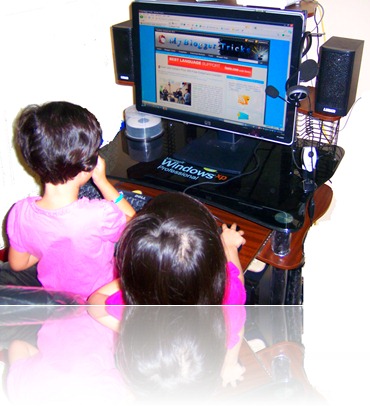
Most of us have a habit of setting our Website as the browser's homepage. Even if you don't have this habit still the website URL is stored in browser's cache.  With at most one desktop computer in the house, its common that it will be used by every family member. Windows has an option of creating multiple accounts but some bloggers and well learnt web masters often don't utilize this option. Even those who create multiple accounts, still prefer to visit there websites on each and every account while in hurry. Being addicted to monitor the status of our websites we often ignore which windows account are we logged in. Is it the one which is your personal account? or the one where you let your children or younger brothers and sisters play video games online?  I have seen that happening to my own account. My younger niece once got confused while playing a game at [a href="http://pbskids.org" target="_blank"]pbskids.org[/a] and she had accidently clicked the Back button of the browser and browsed into my blog's homepage. I had left for prayers and when I was back I found the naughty sitting on my desktop computer and gazing at my Blog. I really don't know how many times she might have clicked the attractive Emoticons appearing on my Adsense Ads!

I shared my story because such accidental clicks can cause a great deal of loss to Adsense trust on you. So please make sure you create a separate protected account for you on your home computer. And never ever visit your blog on other joined accounts because it can really make your heart beat hard! :p

Source: http://www.mybloggertricks.com/2011/05/keep-adsense-ads-out-of-reach-of.html

How To track Downloads On your Website?

<p>Downloads:<a href='http://dstats.net/download/PASTE-FILE-LINK-HERE'></a>
<script type='text/javascript' src='http://dstats.net/dstatsjs.php?file=PASTE-FILE-LINK-HERE'></script>
<script type='text/javascript'>document.write(dsCounter);</script></p>


Grab these Download Buttons.

You can use the following Download buttons from [a href="http://dryicons.com" target="_blank"]dryicons[/a] Simply right click an image and select “Copy Image Location” and this will give you the Image URL for the button.

download_buttons1 download_buttons4
download_buttons2 download_buttons5
download_buttons3 download_buttons6


Once you are done, publish your post and see a beautiful Download button with an auto download tracker hanging inside your post. Enjoy! :)

Source: http://www.mybloggertricks.com/2011/01/how-to-track-downloads-on-your-website.html

How to Show and Hide Widgets in Blogger?

WIDGET CODE GOES HERE

</b:if>

where WIDGET CODE GOES HERE is the code of the widget you want to show or hide.

How to Hide Widgets On Homepages?

Same procedure here,

<b:if cond='data:blog.pageType == "item"'>

WIDGET CODE GOES HERE

</b:if>


How To Show Widgets Only On Static Pages?

<b:if cond='data:blog.pageType == "static_page"'>

WIDGET CODE GOES HERE

</b:if>

How To Hide Widgets On Static Pages?

<b:if cond='data:blog.pageType != "static_page"'>

WIDGET CODE GOES HERE

</b:if>

How To Show a Widget On a Selected Post Only?

<b:if cond='data:blog.url == "URL OF Selected Post"'>

WIDGET CODE GOES HERE

</b:if>

How To Hide a Widget On a Selected Post?

<b:if cond='data:blog.url != "URL OF Selected Post"'>

WIDGET CODE GOES HERE

</b:if>


How To Control Blogger’s Official Widgets?

The same procedure can be applied to Blogger’s official widgets like About Me, Archives, Poll etc. For controlling that widgets do this,

  1. Go To Blogger > Design > Edit HTML
  2. Backup your template
  3. Check the Expand Widgets Templates Box
  4. Search for the title of the widget you want to control
  5. The code for the widget will look something similar to this one,

<b:widget id='HTML' locked='false' title='WIDGET-TITLE-HERE' type='Profile'>
<b:includable id='main'>

LARGE CHUNK OF WIDGET CODE

</b:includable>
</b:widget>

On finding the title in place of WIDGET-TITLE-HERE you will find two similar codes like those I have shown in bolded blue  You just need to add the Controlling codes in the following manner. For example if you wish to show a widget at Homepage only then do this,

<b:widget id='HTML' locked='false' title='WIDGET-TITLE-HERE' type='Profile'>
<b:includable id='main'>

<b:if cond='data:blog.url == data:blog.homepageUrl'>

LARGE CHUNK OF WIDGET CODE

</b:if>

</b:includable>
</b:widget>


That’s it. Do the same for applying any controlling code. I hope this was useful :)

Source: http://www.mybloggertricks.com/2011/01/how-to-show-and-hide-widgets-in-blogger.html

How To Write Search Engine Friendly Blog Post Titles?

seo Nearly 80% percent of the traffic that you receive from Search engines depends on your Post title. Titles are termed as second to Content. Content is surely the King in SEO terminology but Titles follow just after in priority. If blog authors dedicate a minimum of their attention towards how they write their blog post titles then I believe there is nothing else left to optimize. Search engines need a reason to rank you higher in a particular topic and you must know how to provide them with a good reason. Learning SEO is the simplest yet the most important thing when it comes to earning Online and we all should know how to make proper use of this art. So lets look at some useful tips that have always helped me and thousands others.

What is an Optimized title?

An optimized title is one that succeeds in drawing maximum attention of search engine robots towards itself. The simplest way to understand how to develop good SEO skills is to treat search engines like humans and take their likes and dislikes as those of humans. Using this approach here are some of the things that you must know while writing a title. And again its not a philosophy subject with thousands of confusing things to remember. I am just sharing few tips that work and make sense. The three tips below are more than enough to understand what exactly is a search engine friendly title.

  1. [a href="#keyword"]Use Google Keyword tool to analyze Keywords[/a]

  2. [a href="#titlelength"]Keep the Title length to 66 characters[/a]

  3. [a href="#attracting"]Make your title Attractive![/a]

[a name="keyword"]1- Use Google Keyword Tool [/a]

The above title is attracting, contains three keywords i.e Search Engine Friendly , Blog and Post titles with an attracting How-to start and question mark (?) at the end of the title and all this count a total of 53 characters. That's how you hit three birds with one stone!

Analysis,

  • The word websites in the first title is useless for me because this post is for bloggers only and they will often write blogs while searching a query instead of websites.

  • The words Learn, best tips are less effective and not well organized compared to the keywords used in the second title.

  • The first title uses no question marks or good starting keyword while the second does. Exclamation marks (!) and question Marks (?) will always entice the searcher to click, and visit your website over your competitors.

I don’t need to add anything more here because you all are genius enough to apply the common sense and make things more smarter, stunning and intriguing.

Summary

This is what you always need to do while writing highly optimized and attractive Post titles,

  1. Always analyze your keywords using Google Keyword tool.

  2. Spell your words correctly and keep School Grammar in mind

  3. Write Short titles with one or two keywords

  4. Always Keep title length less than 66 characters

  5. Make your title attractive to both robots and readers by adding attention-drawing phrases and symbols. Use  words like How to, Best tips, Top 10, free, easy etc

  6. Always try to end your title with a question mark or an exclamation mark when necessary.


On my next tutorials I will share some important tips on how to optimize the opening paragraph of your articles/posts and will share some secrets of mine. I have also not discussed some more basic things related to title URLs in today’s post because I don’t wanted to make things difficult and we will surely discuss it on coming posts. Till then I hope you will find it really useful and I just hope you learnt something new today. Peace and blessings! :d

Do also read the following post,

  • [a href="http://www.mybloggertricks.com/2009/11/importance-of-post-title-limit-in-eyes.html" target="_blank"]Importance Of Post Title Limit In The Eyes Of Search Engines[/a]

Source: http://www.mybloggertricks.com/2011/01/how-to-write-search-engine-friendly.html

Let Search Engines and Visitors Enjoy Your Blog Posts! – How To?


search-engines-love After having shared the [a href="http://www.mybloggertricks.com/2011/01/how-to-write-search-engine-friendly.html" target="_blank"]importance of Post titles[/a] and [a href="http://www.mybloggertricks.com/2009/11/importance-of-post-title-limit-in-eyes.html" target="_blank"]Post title limit in the eyes of search engines[/a], the next step is to understand the difference between an online blog post and an English essay. Remember the old school days where a teacher would assign us a topic and we had to write a long essay on the chosen topic. Unfortunately some people still haven't get rid of that habit and still waste their precious time by adopting a wrong online writing style. What we write online should not be just appealing and worth reading for our visitors but for search engine Robots too and that matters more. A blog post with straight, plain text, with no headlines, no use of font styles, images, media etc is as boring to a robot as it is to a reader. So today we will learn some important basics that will surely add a delicious spice to your writing styles plus will bring up a significant change in your current organic traffic.


Why Should I read Your Blog?


This is the question that comes first in our mind when we visit a blog and start roaming here and there. But this question is justified and you should always ask yourself as why should someone read your article and to answer it you must fill up all empty buckets. Before I may explain the optimization related tricks I would like you to first carefully see these two examples,

Below is a screenshot of a poorly optimized and organized post,un-optimized-article 

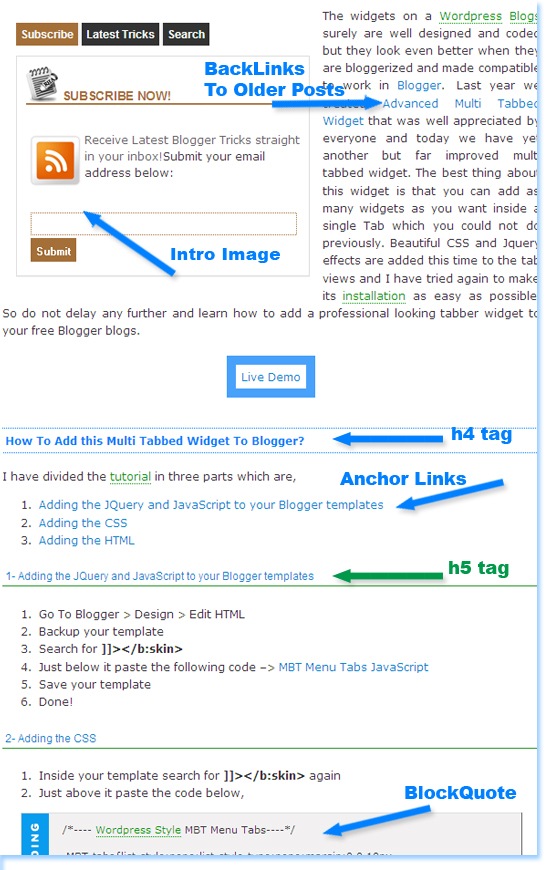
And below is the screenshot of the same post but with a look that both readers and search engines welcome warmly.
Optimized-Post

See the difference? Now learn the good way of beautifying your written style and making the best use of your online time.


How To Let Search Engines and Readers Love Your Posts?


My main focus today is not just to share optimizing tips but on how to write a best post possible. So lets learn the basic building blocks of a good online post. Following are some of the secrets and tips of adopting the best online writing style in order to attract both readers and search engines.


1-   Write a highly optimized starting paragraph –The Intro


What catches a reader’s eye is how you win his interest from the starting intro Para and what catches a search engine robot’s attention is how you choose good keywords. So how exactly we do this. The tips are simple,


Start your Paragraph with an old story. i.e Link previous posts that may be related to the new one or link important tools and related websites. If the post is a unique one and has no relation with your previous posts then simply give some background story of it with a latest rumor related to it. Try drawing reader’s attention and let him believe that this post is not just an ordinary one.  Use [a href="https://adwords.google.com/select/KeywordToolExternal" target="_blank"]Google Keyword tool[/a] and choose the best words for your intro.

Advantages:


  • Correct Keywords will attract robots more and more.

  • With back links to Older Posts, their importance (PR) in the yes of robots will significantly increase.

  • With an old story and link to previous posts, readers will get interested in the post.


2-   Always Add an Intro Image

Add an intro image and align him at the left of your intro paragraph. Tag the image with proper keywords that may describe your post content. For example in the intro image of today’s post I have tagged the image in this way,


< img alt="Search Engines Love" src="Image-Link"/>

Advantages:


  • This way you will drive traffic from Google Images too. Tag also all other images  that appear in your posts with relevant keywords but don’t tag them with same keywords again and again. Be versatile.


3-  Add Anchor Tags To Important Sections Of Your Post


Divide Your Articles/posts into sections and link each section using an anchor link. Links do surely play more significant role than a plain text. The more you tag your posts with links the better it is. Anchor tags to each separate portion of your post will force the robot to crawl and index your posts more deeply. In fact engaging a robot more into your content is like seducing it with your play of words! 

Advantages:


  • Your content will be crawled and indexed better and not overlooked.

  • This technique helps you to win over your competitors. Few months ago MBT blog was ranked 7th for the keyword “Blogger Tricks” and today it is ranked the third. See it for yourselves,


Search-Engine-Ranking


4-   Add h4 and h5 Tags


UPDATE:  Since We have recently updated the structure by adding H2 Tag to post titles so now instead of H4 use H3 and instead of H5 use H4. Rest everything remains the same.


What do we read and give importance first when we read a Newspaper? Of course the Headlines! Similar logic does apply to Headlines that appear in our posts. Readers and Robots attraction is greatly drawn by the HTML  Heading tags. Heading Tags have more importance then a normal plain text. The largest size and most important Heading tag is the H1 tag and this tag by default is added to your Blog Homepage title in [a href="http://blogger.com/" target="_blank"]Blogger[/a], next comes H2 which is added to Blog Description and the H3 which is added to Blog Post titles and what is left are H4 and H5 tags. So you must make use of this golden opportunity. The Blue headline text that you always see in my posts are the H4 tags and the green ones are the H5 tags in descending order of importance. As shown below,

 Optimized-Post

Advantages:


  • These tags will highlight important sections to robots and Readers

  • Again an edge over your Competitors!

  • More chances to get better indexed!


In order to know how to customize the HTML Heading tags in your blogs I am sure you would love reading  [a href="http://www.mybloggertricks.com/2009/11/change-heading-style-in-blogger.html" target="_blank"]6 ways To Customize Heading Style In Blogger and Wordpress[/a]


5-  Highlight  What is important!

Read the text below,

Un-customized-Text

Now Read this text,

Customized-Text


Which one attracted your eyes the most? I am sure you chose the second one and that’s where the secret lies.. Just how it attracted you , a highlighted and well presented post attracts Robots and makes their job more easy and enjoying. Thus they rank you higher and fall in love with what you write!


Final Word Of Advise


I will let the rest things on you and would end up today’s tutorial with just a simple rule of thumb and that is “Whether it be a human or a machine, they all love grace and colors, so be graceful and be colorful. At least one of them could fall in love with you!”


That’s all for today! :>

Source: http://www.mybloggertricks.com/2011/02/let-search-engines-and-visitors-enjoy.html

What it takes to become a Humble Blogger?

1-   Be Simple in writing, Moderate Your Vocabulary


I hope it helps you in becoming the one! [a href="http://e" target="_blank"]Best Wishes[/a]. :)


Wajiha

About the Guest Author:
Syeda Wajiha Maryam is an Engineering Student at NED University of Engineering and Technology. She has a keen interest in Blogging and just recently she started her own personal diary at [a rel="nofollow" href="http://redsneakerstory.blogspot.com/" target="_blank"]Red Sneaker Story[/a]. You can keep in touch with her on [a rel="nofollow" href="http://www.facebook.com/profile.php?id=706716067" target="_blank"]Facebook[/a]

Source: http://www.mybloggertricks.com/2011/02/what-it-takes-to-become-humble-blogger.html
 
Play : Agame | Y8 Games | Y3 Games
Copyright © 2011. Blogger Tips And Tricks 2012 - All Rights Reserved

Proudly powered by Blogger