PayPal Now a Problem For Indian Users!

paypal restrictions in india PayPal is an e-commerce business company of [a href="http://ebay.com" target="_blank"]eBay Inc.[/a] PayPal allows Online Payment Transfers and processing. Currently, PayPal manages more than 230 million accounts, more than 87 million of them active. It allows customers to send, receive, and hold funds in 24 currencies worldwide. According to [a title="http://trends.builtwith.com" href="http://trends.builtwith.com" target="_blank"]trends.builtwith.com[/a]  349,143 websites use PayPal. 14,500 websites within the top million most visited sites on the internet. It is a US$2.23 billion worth company! :>

[a name='more'][/a]

I was busy with exams but was really shocked when I heard of PayPal disappointing policies for our Indian friends and readers. Unfortunately from 1st March 2011, PayPal made changes to the User Agreement for Indian users to comply with Reserve Bank of India regulations. Some Significant changes to the agreement were:

  • Export related payments for goods and services must not exceed $500.
  • Any balance or future payments must not be used to buy goods or services but transferred to a bank account within 7 days from the receipt of payment.
  • Credit/Debit cards must be used for payment processing through Paypal

The above information can be verified at [a title="https://www.paypal-apac.com/india/" href="https://www.paypal-apac.com/india/" target="_blank"]Paypal-apac.com/india/[/a]

Many questions are revolving as to why PayPal had to take such strict steps in order to comply with RBI Guidelines but no matter whatever the reason may be Indian fellows really need tonnes of solution to keep their online money transfer going smooth.

I have got a solution that might be helpful to my Indian friends as well as for people from Afghanistan, Iran, Iraq, Pakistan and Egypt where PayPal is banned. My Next post will contain a practical solution to use PayPal in Banned Countries and will also be helpful to Indian users who are currently in a not much favoring state.

Do You know a Solution?

We would highly appreciate to hear of any working and successful solutions from your side. We will publish our solution within 24 hours.

Source: http://www.mybloggertricks.com/2011/05/paypal-now-problem-for-indian-users.html

Top Ten Reasons Why I can't Stop Using Facebook?

Yeah, I'm not hidden on Facebook. I can easily share my ideas and several other things,  bring forward whatever is in my mind and share people's ideas. In this way, I learn many things about others as well as many other ideas/sites and many other things!


So?

thinking In a nutshell, I would just say leaving Facebook is the hardest thing I would ever do. I guess 15 times, I deactivated my account vowing that I won't ever use Facebook...but the addiction gets me back to it.
If you're a Facebook addict like me; don't worry. If you check in to the Facebook world every now and then,you just keep having fun,and having fun is nothing bad.
And if people horrify you by the Facebook Addiction Disorder(FAD), just tell them that it isn't in any of the medical books! But at the same time you should think "Do my Facebook friends have to know every time when do I hang out and what I do all the time?" :p


 607432251367010393Amna Masood Khawaja


About the Guest Author:
Amna has always been a valuable MBT contributor, smooth writer, and a kind socializing person. She is pursuing her B.E Degree in Computer and Information System Engineering. During her Leisure time she loves to share and post her Random Rumblings.

Source: http://www.mybloggertricks.com/2011/05/top-ten-reasons-why-i-can-stop-using.html

How To Use PayPal In Iran, Egypt and Pakistan?

[a href="http://www.blogger.com/profile/13597329800723396260" target="_blank"]Bhavesh[/a] from [a title="http://www.plentyofebooks.net/" href="http://www.plentyofebooks.net/" target="_blank"]Plenty of Ebooks[/a] Suggested some new Ways for Indian Users which I have shared below,

" The only solution right now is either use debit/credit cards for online payment or switch to moneybookers or alertpay. The second option doesn't guarantee that your problem is solved forever because as more people switch to other options RBI can impose these rules on moneybookers and alertpay as well in future.
Another solution for payments is using VCC but not a very good idea I think.
As for receiving money is concerned here is an eg. what you can do.
Eg. You are about to receive 1000 USD from someone but the limit is 500 USD. So what you can do is get that 1000 in two transactions of 500 USD each. It doesn't matters how many times in a month you receive 500 USD.
The rules are not fully implemented yet in all accounts. Some are able to send money as they used to do before and some cannot. Its just a matter of time when the rules are fully implemented.
Although I don't see that anything is gonna change in these pathetic rules you can still take a step forward a make a petition on the following site informing RBI how these rules affects you.
Here is the site where you can file your petition:
[a href="http://ieoi.in/"]Internet Entrepreneurs of India's Petition to RBI [/a]"

I also asked him to further explain what VCC is and how widely do people use [a href="http://www.moneybookers.com/app/" target="_blank"]Money bookers[/a] and [a href="https://www.alertpay.com/en/Default.aspx" target="_blank"]alertPay[/a]. To which he answered:

"VCC (Virtual Credit Card) is somewhat like a temporary credit card you can say. It is valid just for just 24 hours. Not all banks provide this service. HDFC Net Safe provides a VCC.
To create a VCC you need to have an actual credit/debit card. After creation you get a different 16 digit no. and CVV no. etc etc. which is not related to your actual credit/debit card. By this you can shop online without worrying because it will expire in 24 hrs. and also you can set a limit of how much to use in that VCC. So VCC is for some one who do not want to pay online regularly or for people who are concerned about the security. For people who pay regularly online then attaching a credit/debit card to paypal is best option so far I think.
And about alert pay and money bookers, I can say that money bookers is now getting popular after this paypal issue. Many people are switching to them because these rules are only imposed on paypal at the moment. But it will take time for online retailers because not all of them uses Money Bookers at the time because paypal was ruling but I guess they will start adding money bookers as an option for payment as well. Again its just a matter of time :)"

How Far Do You think This Solution Sounds For you?

I would highly appreciate any other working solution that you may have practically applied and it worked for you. The solution above is what I personally applied and it worked just fine for me. I just hope it proves useful to most of you. Peace and blessings :>

Source: http://www.mybloggertricks.com/2011/05/how-to-use-paypal-in-iran-egypt-and.html

Use Windows Live Writer & Kick Blogger Editor!


Why Still Blogger Editor?

The Question that comes to my mind is why still Blogger Editor when there exists such a highly developed Editor that does half the work on your part?  From what I have observed is lack of WLW promotion in this respect. Not many tutorials are written on WLW features and therefore newbie bloggers are still un ware of this great magical tool. I will write a comparison Chart of Windows Live Writer VS Blogger Editor 2011 on my next post. Till then I am sure the videos below will help you greatly in better understanding the use of this great blogging software. I honestly can't blog without it. The New Windows Live Writer 2011 has complete Microsoft Office Functions in it.


1)  Getting Started With Windows Live Writer


2) Basic Authoring Of Windows Live Writer


3) Using Pictures, Videos, Maps and Plugins With WLW


4) Publishing a Post and Viewing it Live

Source: http://www.mybloggertricks.com/2011/05/use-windows-live-writer-kick-blogger.html

How To Do Mobile Blogging Using Android Phone?


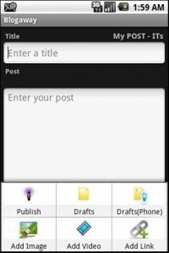
Blogging Using Android[a href="http://developer.android.com/index.html" target="_blank"]Android developers[/a] have developed software for updating your blog with the help of just an android phone. The software is called, BlogAway. The application has been developed by [a href="http://blogaway.kbeanie.com/" target="_blank"]kumar bibek[/a]. It works perfectly with blogger. Many other applications have also provided this functionality but what make this android app unique are its exciting new features. Some of the extraordinary features are mentioned below,


[a href="http://www.androidzoom.com/android_applications/social/blogaway_bdoa.html" target="_blank"]Download BlogAway[/a]


[a name='more'][/a]


Offline Blogging


OfflineBloggingBlogAway Allows you to write posts while you’re not connected to the internet and as soon as you connect to the internet the posts are published. You can write a blog post while you’re stuck in a traffic jam, experiencing a power failure or even if you’re too lazy to open a computer or a laptop to write a post.


Multiple Account Support


android_blogawayYou can use multiple blogger accounts with it. If you have more than one blogger accounts then you can use this feature and update both of your blogs with the same application and the same phone.


Powerful Text Editor


AndroidPhone


BlogAway brings the most powerful text editor that I have ever heard of. It allows following features,


1) Blog , Italic and Underline


You can make the text bold, italic or underlined.


2) Add Colors to your post


With BlogAway you can change the colors of your post. You can add different colors to your post.


3) Add links


The facility to add links is also provided


4) Add labels


You can add labels to your post and also add geo-tags.


5) Add Images and Videos


You can add images and videos to the post but lacks the capability to upload images via link.


6) Use your Signature


signature


  You can also add your GPS position and signature to the post with it.


Freeware


FreewareThe application is a freeware so you don’t have to pay a single penny for it. You can get the application for free from the developer’s page.


Comment Back


It allows you to comment back on your blog so now you can respond to your reader’s feedbacks easily.


Read other blogs


You can read the other blogs that you follow on Google reader.


Automatic Saving in Drafts


BlogAway creates a copy of your post as soon as you start writing the post. So if for any reason you do not save the post the application does it for you.


Link your post to Facebook and twitter


ShareOnFbTwttr


You can share you post to Facebook and twitter by ticking the options of share on twitter and share on Facebook.


User Friendly


Its quite user friendly and you would surely feel comfortable while using it. Most the options are displayed on the main screen, navigation is easy and its quite easy to explore the options.
You can always contact the application developer at [a href="http://blogaway.kbeanie.com/" target="_blank"]his website[/a]. He has been reading comments from the user and producing new versions after removing the bugs. If you find any bug or you want to suggest a new functionality you can always let him know.



 6074322513670103934Fahad Uddin


About the Guest Author:
Fahad is an Undergraduate Student, pursuing his B.E Degree in Computer and Information System Engineering. He is an excellent programmer and part time blogger. He Writes at [a href="http://mycsnippets.blogspot.com/" rel="nofollow" target="_blank"]My C Snippets[/a]. You can always contact him at [a href="http://www.facebook.com/fahd92" rel="nofollow" target="_blank"]Facebook[/a]


Source: http://www.mybloggertricks.com/2011/05/mobile-blogging-using-android-phone.html

Newer, Older, Home Links Not Visible In Blogger


   4.   And replace it with this code,

#blog-pager-newer-link {
    float: left;
        display:inline;
       
}
#blog-pager-older-link {
    float: right;
        display:inline;
}
#blog-pager {
    text-align: center;
        clear:both;
       
}


  5.    View Your template now to see Links or buttons appearing just below Post Body.

To Download Buttons For These Links Kindly try these,

  • [a title="http://www.mybloggertricks.com/2009/12/replace-newer-older-and-home-links-with.html" href="http://www.mybloggertricks.com/2009/12/replace-newer-older-and-home-links-with.html" target="_blank"]Shiny Buttons For Older, Newer and Home Links[/a]
  • [a title="http://www.mybloggertricks.com/2009/12/change-newer-posts-older-posts-and-home.html" href="http://www.mybloggertricks.com/2009/12/change-newer-posts-older-posts-and-home.html" target="_blank"]Cute Buttons For Older, Newer and Home Links[/a]
Source: http://www.mybloggertricks.com/2011/05/newer-older-home-links-not-visible-in.html

IE8 Website Operation Aborted Error Finally Solved!

I am really glad I got rid of this extremely disappointing error which caused me great loss for a month.

Final Advise

If you really want to enjoy browsing the internet then please stop using IE and start using [a href="http://mozilla.com" target="_blank"]Mozilla Firefox[/a]. Mozilla is used by developers, designers and normal net surfers and it is best in every aspect. That's what I believe in.

Source: http://www.mybloggertricks.com/2011/05/ie8-website-operation-aborted-error.html
 
Play : Agame | Y8 Games | Y3 Games
Copyright © 2011. Blogger Tips And Tricks 2012 - All Rights Reserved

Proudly powered by Blogger